
There are a number of best practices when it comes to Async what I’ll try and cover here are the “guidelines” than actual rules. There are exceptions to each of these guidelines. The guidelines are summarised in the table below.
Continue reading How to Async
All posts by bryan

How to handle Events between Applications
The problem?
How can application A, handle events sent by an application B, and how to implements those events in B? Knowing that B has no idea of the existence of A.
Continue reading How to handle Events between Applications

Story pointing
Procedure & Rules
An important element of Scrum is to estimate the complexity of features in the product backlog. For the estimation process, we use a simplified Fibonacci sequence: 0, 1, 2, 3, 5, 8, 13, 20, 40, 100.
Continue reading Story pointing

Development Process Flow
Your software team has a process that use to complete work. Normalizing that process–i.e., establishing it as a workflow–makes it structured and repeatable, which, in turn, makes it scalable. With your development team, you can take an iterative approach to workflow management because it helps you meet your goals faster and exemplifies your team culture.
Continue reading Development Process Flow

Break apart the connection string
It is sometimes useful to know which database you are connected to, here is a simple method that pulls apart the connection string and provides you with the section you request. Continue reading Break apart the connection string

Difference between == and === in JavaScript
The 3 equal signs mean “equality without type coercion”. Using the triple equals, the values must be equal in type as well.
0 == false   // true
0 === false  // false, because they are of a different type
1 == "1"     // true, automatic type conversion for value only
1 === "1"    // false, because they are of a different type
null == undefined // true
null === undefined // false
'0' == false // true
'0' === false // false
Creating API Help Pages
Install ASP.NET and Web Tools 2012.2 Update. This update integrates help pages into the Web API project template.
Next, create a new ASP.NET MVC 4 project and select the Web API project template. The project template creates an example API controller named ValuesController. The template also creates the API help pages. All of the code files for the help page are placed in the Areas folder of the project.
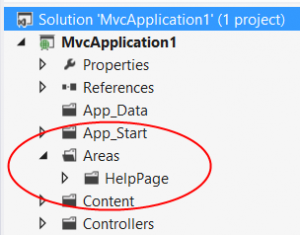

DateTimeOffset for SOAP
If you are serious about using SOAP, it won’t be long before you find out that if you need a full ISO date in the XML, it will not work using C# and SOAP, as DateTimeOffset is not supported from Microsoft.
Here is how you go about ensuring that you deliver an ISO DateTime formatted field in SOAP.
Continue reading DateTimeOffset for SOAP

Bing Maps in an MVC Application
Here is a simple example of how to use Bing Maps in an MVC application.
I am using Bing Maps V8 which is the current version of Microsoft.
Also, nothing that document.ready will fire long before the map script loads as it loads asynchronously. Sometimes document.ready will fire before the page is loaded which means the map div might not even be available. To overcome this, we are using the callback parameter of the map script UR: for example:
http://www.bing.com/api/maps/mapcontrol?callback=LoadMap
Continue reading Bing Maps in an MVC Application

Caching to improve the user experience
(Added LazyCache in to the Testing)
One of the essential factors in building high-performance, scalable Web applications is the ability to store items, whether data objects, pages, or even parts of a page in memory the initial time they are requested. You can save these items on the Web server or other software in the request stream, such as a proxy server or at the browser. This allows you to avoid recreating information that satisfied a previous request. Known as caching, it will enable you to use many techniques to store page output or application data across HTTP requests and reuse it. When the server does not have to recreate information you save time and resources, and throughput and scalability increase.
It is possible to obtain significant performance improvements in ASP.NET applications by caching frequently requested objects and data in either the Application or Cache classes. While the Cache class indeed offers far more flexibility and control, it only appears to provide a marginal advantage regarding increased throughput over the Application class for caching. It would be challenging to develop a testing scheme that could accurately measure the potential benefits of the Cache class’s built-in management of lesser-used objects through the scavenging process as opposed to the fact that Application does not offer this feature. The developer needs to decide this case and should be based on the needs and convenience of the project and its usage patterns.
In the article, I’ll be looking at the application caching and what is the most effective and scalable options. If you would like to know more about the web caching then take a look at the Microsoft Caching Architecture Guide for .NET Framework Applications
So we all know that caching increases performance, what I am not getting into here is when it should be used or when it shouldn’t be used. I’m more interested in the performance and scalability of the caching used.
The performance testing I am going to use the following different caching methods:
- No Caching
- Memory Cache
- Memory Cache using Statics
- Memory Cache using Singleton
- HttpRuntime Cache
- Redis Cache (You’ll need to setup a local Redis server in order to see the results, here is the Windows Redis Service installer)
- LazyCache
I’ve tried to provide some different options that are available for Caching, if you know of any others, please let me know and I’ll add them to this post.
There are two types of tests I am using a small test which waits for 30 milliseconds and then returns back the current date and time:
Thread.Sleep(30);
return System.DateTime.UtcNow.ToString(CultureInfo.InvariantCulture);
then a test to generate a much large object of 267 Mb
public IEnumerable<Block> GetData()
{
    // should eat around 267 Mb of RAM.
    var blocks = new Block[512 * 512 * 1];

    for (var i = 0; i < (512 * 512) * 1; i++)
    {
        blocks[i] = new Block();
    }
    return blocks;
}
Both are straightforward tests, by no means are they an accurate representation of real-world methods, but they do show you how it affects the performance when using different Caching.
The idea is to iterate around these test 1,000 times and record how long it takes for each test, what I don’t do here is work out the amount of memory is being used (if you know of an easy way to include this, please let me know).
I won’t go into great details here on the results of the tests as I think you’ll find them self-explanatory in the test application, attached at the bottom of this post.
Few things to note about the testing and results is that you should use a Paralling process for the examination, as this will be much closer to the real world multi-threading environment.
Also, careful consideration should be given to using locking in the Cache module, as you don’t want the same cache key function running while another one is trying to process the same function, it should wait until the process has finished and stored it into the cache to increase performance.
Here is the sample code with different sample tests showing how useful each option is