All posts by bryan

Denial Of Service (DoS) attacks via SQL Wildcards should be prevented

SQL Wildcard attacks force the underlying database to carry out CPU-intensive queries by using several wildcards. This vulnerability generally exists in search functionalities of web applications. Successful exploitation of this attack will cause Denial of Service (DoS).

Depending on the connection pooling settings of the application and the time taken for attack query to execute, an attacker might be able to consume all connections in the connection pool, which will cause database queries to fail for legitimate users.

By default in ASP.NET, the maximum allowed connections in the pool is 100 and timeout is 30 seconds. Thus if an attacker can run 100 multiple queries with 30+ seconds execution time within 30 seconds no one else would be able to use the database related parts of the application.

Recommendation

If the application does not require this sort of advanced search, all wildcards should be escaped or filtered.

References:

OWASP Testing for SQL Wildcard Attacks

https://www.owasp.org/index.php/Testing_for_SQL_Wildcard_Attacks_(OWASP-DS-001)

DoS Attacks using SQL Wildcards

http://www.zdnet.com/blog/security/dos-attacks-using-sql-wildcards-revealed/1134

Brief Summary

SQL Wildcard Attacks are about forcing the underlying database to carry out CPU-intensive queries by using several wildcards. This vulnerability generally exists in search functionalities of web applications. Successful exploitation of this attack will cause Denial of Service.

Description of the Issue

SQL Wildcard attacks might affect all database back-ends but mainly affect SQL Server because the MS SQL Server LIKE operator supports extra wildcards such as “[]”,”[^]”,”_” and “%”.

In a typical web application, if you were to enter “foo” into the search box, the resulting SQL query might be:

SELECT * FROM Article WHERE Content LIKE ‘%foo%’

In a decent database with 1-100000 records the query above will take less than a second. The following query, in the very same database, will take about 6 seconds with only 2600 records.

SELECT TOP 10 * FROM Article WHERE Content LIKE ‘%_[^!_%/%a?F%_D)_(F%)_%([)({}%){()}£$&N%_)$*£()$*R”_)][%](%[x])%a][$*”£$-9]_%’

So, if the tester wanted to tie up the CPU for 6 seconds they would enter the following to the search box:

_[^!_%/%a?F%_D)_(F%)_%([)({}%){()}£$&N%_)$*£()$*R”_)][%](%[x])%a][$*”£$-9]_

Black Box testing and example

Testing for SQL Wildcard Attacks:

Craft a query which will not return a result and includes several wildcards. You can use one of the example inputs below.

Send this data through the search feature of the application. If the application takes more time generating the result set than a usual search would take, it is vulnerable.

Example Attack Inputs to send

    ‘%_[^!_%/%a?F%_D)_(F%)_%([)({}%){()}£$&N%_)$*£()$*R”_)][%](%[x])%a][$*”£$-9]_%’
    ‘%64_[^!_%65/%aa?F%64_D)_(F%64)_%36([)({}%33){()}£$&N%55_)$*£()$*R”_)][%55](%66[x])%ba][$*”£$-9]_%54’ bypasses modsecurity
    _[r/a)_ _(r/b)_ _(r-d)_
    %n[^n]y[^j]l[^k]d[^l]h[^z]t[^k]b[^q]t[^q][^n]!%
    %_[aaaaaaaaaaaaaaaaaaaaaaaaaaaaaaaaaaaaaaaaa[! -z]@$!_%

…

Result Expected

If the application is vulnerable, the response time should be longer than usual.

SQL Wildcard attacks force the underlying database to carry out CPU-intensive queries by using several wildcards. This vulnerability generally exists in search functionalities of web applications. Successful exploitation of this attack will cause Denial of Service.

Here, it was possible to search by keying in a value for the forename/firstname field as M__E (i.e. M underscore underscore E) and the search returned results treating the two underscores as wildcards for any two characters.

This may still exist on the current code base so it’s a case of going through the forms and ensuring that it doesn’t occur / fix it if the vulnerability exists.

DoS Attacks Using SQL Wiltcards.pdf (567.23 kb)

Check the solution I have produced to prevent this Removing and Cleaning search content to prevent DoS attacks

HTTP Header Disclosure

Vulnerability overview/description

Due to unsanitized user input it is possible to inject arbitrary HTTP header values in certain HTTP responses of the Satellite Server. This can be exploited, for example, to perform session fixation and malicious redirection attacks via the Set-Cookie and the Refresh headers. Moreover, the Satellite Server caches these HTTP responses with the injected HTTP header resulting in all further requests to the same resource being served with the poisoned HTTP response, while these objects remain in cache.

Information Disclosure

Information disclosure enables an attacker to gain valuable information about a system. Therefore, always consider what information you are revealing and whether it can be used by a malicious user. The following lists possible information disclosure attacks and provides mitigations for each. 

Message Security and HTTP

If you are using message-level security over an HTTP transport layer, be aware that message-level security does not protect HTTP headers. The only way to protect HTTP headers is to use HTTPS transport instead of HTTP. HTTPS transport causes the entire message, including the HTTP headers, to be encrypted using the Secure Sockets Layer (SSL) protocol.

http://msdn.microsoft.com/en-us/library/aa738441/ 

Environment change

The web application returned information about itself in the HTTP header that could aid an attacker.  Default web server installations often include the vendor and version details of the web application, and possibly further information about scripting services also installed

User Enumeration – Login failure messages shouldn’t give out any information that results in vulnerabilities.

Is it possible to enumerate user account details within the Web application via the logon page?

Where an application requires account details to retrieve other information, it may be possible to enumerate the details based on the error message returned by the application.

In this case it was also possible to determine the state of the user account

Recommendation:

Messages which allow an attacker to enumerate account details should be removed. A generic error message which does not disclose information about account information should be used.

References:

OWASP Testing for user enumeration

https://www.owasp.org/index.php/Testing_for_user_enumeration_(OWASP-AT-002)

Enumeration

  • Enumeration is the first attack on target network, enumeration is the process to gather the information about a target machine by actively connecting to it.
  • Enumeration means to identify the user account, system account and admin account. Enumerating windows active directory to find out these stuffs.
  • Discovering NetBIOS name enumeration with NBTscan.
  • Establishing null sessions and connections. Null sessions tools like Dumpsec, Winfo and Sid2User or more, may used to perform this attack.

The login failure messages can give away too much information and it would be possible to enumerate user details via the log-on page. It reports on whether an account exists/not and if an account is locked out or not etc.

There should ideally be just one generic message that’s of no use to a potential hacker.

– See more at: http://www.ehacking.net/2011/04/scanning-and-enumeration-second-step-of.html#sthash.B3KW4Kcs.dpuf

Other Considerations

You’ll need to log somewhere in your application the actual reasons why the user could not login, this could be that the account is locked, suspened, deleted etc. 

By logging this information a system adminstrator or the like can see why a user could not get access to the application through the login page.

PenTest where to start

I would like to secure up an MVC application, and one way of insuring a secure application is to run through pentesting, Penetration Testing, but what is pentesting?

Wikipedia

A penetration test, occasionally pentest, is a method of evaluating computer and network security by simulating an attack on a computer system or network from external and internal threats. The process involves an active analysis of the system for any potential vulnerabilities that could result from poor or improper system configuration, both known and unknown hardware or software flaws, or operational weaknesses in process or technical countermeasures. This analysis is carried out from the position of a potential attacker and can involve active exploitation of security vulnerabilities.

Pentests should performed be by someone who has no involvement in the application lifecycle process, someone or some group of people who are independent and will try and penetrate the application.  They will uncover security issues through penetration tests which are presented to the system’s owner. Effective penetration tests will couple this information with an accurate assessment of the potential impacts to the application and outline a range of technical and procedural countermeasures to reduce risks.

Penetration tests are valuable for several reasons:

  1. Determining the feasibility of a particular set of attack vectors
  2. Identifying higher-risk vulnerabilities that result from a combination of lower-risk vulnerabilities exploited in a particular sequence
  3. Identifying vulnerabilities that may be difficult or impossible to detect with automated network or application vulnerability scanning software
  4. Assessing the magnitude of potential business and operational impacts of successful attacks
  5. Testing the ability of network defenders to successfully detect and respond to the attacks
  6. Providing evidence to support increased investments in security personnel and technology

In a series of blogs I will be going over everything that I find and document down how to overcome such vulnerabilities.

Elmah or Microsoft Enterprise Library for Exception logging


Enterprise Library Logging Application Block

The Enterprise Library Logging Application Block simplifies the implementation of common logging functions. You can use the Logging Application Block to write information to a variety of locations:


·         The event log

·         An e-mail message

·         A database

·         A message queue

·         A text file

·         A Windows® Management Instrumentation (WMI) event

·         Custom locations using application block extension points

Features

·         Multiple targets can be configured

·         Enterprise Library Configuration Console available for easy configuration

·         Large number of options to be configured may make it a bit daunting to start with

·         Invasive – requires code change to implement logging

·         Logs all kinds of events/information, not just for error logging

·         Formatters available for formatting the event message

·         Log filters allow filtering of log messages

·         Facilities for WCF integration


·         It will take you a bit to get up to speed with Enterprise Library – it’s not a 5 second install.

·         There’s a lot of configuration to do in the app.config/web.config file just to make it work. That said, once you understand it, it easier on other projects.

·         You must implement the Logging Block, not just the Exception Handling Block to log the information somewhere (event log, flat file, database, etc.)

·         It’s not just for logging exceptions. For example, you may want to get log events for when a user logs in or logs out of an application.

·         You can use the configuration file to change how logging works depending on the environment (i.e. Log exceptions for Production, log everything for Dev, etc.).

·         It’s not just for web, but for all kinds of applications.


ELMAH


ELMAH (Error Logging Modules and Handlers) is an application-wide error logging facility that is completely pluggable. It can be dynamically added to a running ASP.NET web application, or even all ASP.NET web applications on a machine, without any need for re-compilation or re-deployment.


Once ELMAH has been dropped into a running web application and configured appropriately, you get the following facilities without changing a single line of your code:


    Logging of nearly all unhandled exceptions.

    A web page to remotely view the entire log of recoded exceptions.

    A web page to remotely view the full details of any one logged exception, including coloured stack traces.

    In many cases, you can review the original yellow screen of death that ASP.NET generated for a given exception, even with customErrors mode turned off.

    An e-mail notification of each error at the time it occurs.

    An RSS feed of the last 15 errors from the log.


Runs using the Apache License (open source)


Comparison with ELMAH

Feature/s

Logging Application Block

ELMAH

Scope

  • True enterprise level exception handling framework, across layers, tiers, processes and services (in tandem with Exception Handling Application Block)
  • Logs all kinds of events, not just exceptions
  • Lightweight logging framework with extension points for ASP.NET web applications
  • By default logs unhandled exceptions
  • Error signaling allows handled exceptions to be logged
  • No support for non-error messages

Targets supported

  • The event log
  • An e-mail message
  • A database (supports multiple)
  • A message queue
  • A text file
  • A Windows® Management Instrumentation (WMI) event
  • Custom locations using application block extension points
  • Microsoft SQL Server
  • Oracle (OracleErrorLog)
  • SQLite (version 3) database file
  • Microsoft Access (AccessErrorLog)
  • Loose XML files
  • RAM (in-memory)
  • SQL Server Compact Edition
  • MySQL
  • PostgreSQL

Pluggable?

No. Requires careful configuration and implementation in code

Fully pluggable out of the box, requires only configuration for basic features

Configuration

  • XML configuration in the app.config/web.config as applicable
  • Enterprise Library Configuration Console tool available for ease in configuration

XML configuration in the web.config

Intrusiveness

Requires code change for implementation

No code change required for basic features

Extensibility

  • Easily extensible with multiple points for extensibility
  • Easy to extend for log message formatting and contextual information
  • No source code change required
  • Requires change to source code for any kind of extensibility
  • Error message formatting and contextual information addition requires source code changes

Scalability

  • Easily scales for small to medium sized applications
  • Not enough data available for large sized applications

Requires more research


Summary

The Logging Application block beats ELMAH hands down in comprehensiveness. It can be used for logging all kinds of messages from all layers of various kinds of applications including ASP.NET, windows forms, WCF services etc. It can also be used for tracing for performance and debugging purposes.

On the other hand ELMAH is a light-weight framework for logging exceptions in ASP.NET applications.

ELMAH is very easy to configure and use. It is fully pluggable. Whereas implementation of the Logging Application block requires careful planning, configuration and is intrusive as it requires changes to code wherever logging is required.

One of the biggest benefits of the Enterprise Library is that it works in tandem with the Exception Handling block to implement a consistent strategy for processing exceptions in all the architectural tiers of an enterprise application including WCF Services.

While ELMAH is perfect for ASP.NET applications, for enterprise applications the Enterprise Library fulfils the comprehensiveness required.

No Caching in any Browser

I need to stop caching across all browsers of my website for security reasons.  This has been driving me nuts over the past two weeks, as every method I try just keep allow some caching to be stored.  Easiest way to check is by pressing the back key on the browsers window as the results should update.

I finally found a solution

using HTML:

<meta http-equiv="Cache-Control" content="no-cache, no-store, must-revalidate" />
<meta http-equiv="Pragma" content="no-cache" />
<meta http-equiv="Expires" content="0" />

In ASP.NET

Response.AppendHeader("Cache-Control", "no-cache, no-store, must-revalidate"); // HTTP 1.1.
Response.AppendHeader("Pragma", "no-cache");
Response.AppendHeader("Expires", "0"); 

The Cache-Control is per the HTTP 1.1 spec for clients (and implicitly required by some browsers next to Expires), the Pragma is per the HTTP 1.0 spec for clients and proxies and Expires is per the HTTP 1.1 spec for clients and proxies. Other Cache-Control parameters are irrelevant if the above mentioned three are specified. The Last-Modified header as included in most other answers here is only if you actually want to cache the request, so you don’t need to specify it at all.

Note that when the page is served over HTTP and a header is present in both the HTTP response headers and the HTML meta tags, then the one specified in the response header will get precedence over the HTML meta tag. The HTML meta tag will only be used when the page is viewed from local disk file system. See also W3 HTML spec chapter 5.2.2. Take care with this when you don’t specify them programmatically, because the web server can namely include some default values. To verify the one and other, you can see/debug them using Firebug Net panel.

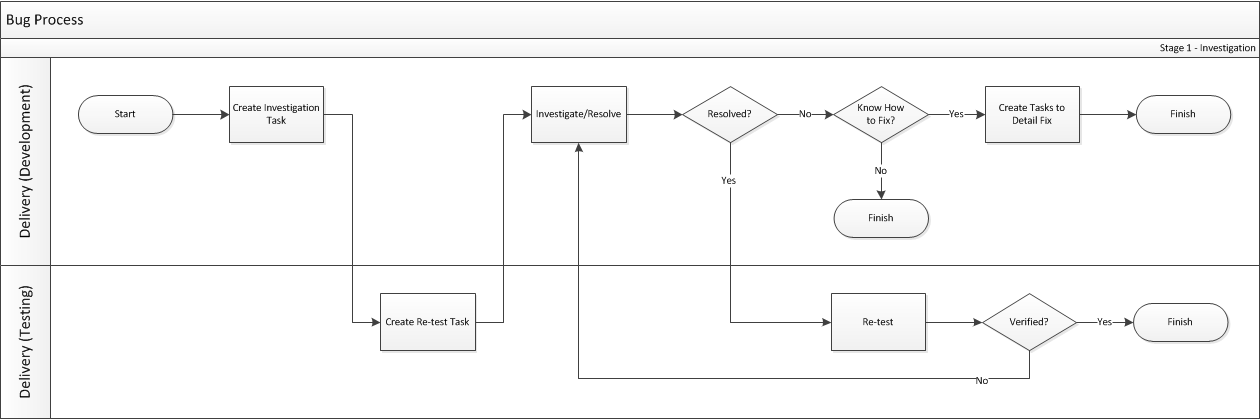
Bug Process

Background


Note:  Click the process for a larger version.

 
When a bug is first created it is assigned a nominal story point value of 1.  This value is intended to cover the investigation phase of the bug only (or a fix if it’s found to be a small issue).  Having a story point value against the bug  (even if it only covers investigation initially) means that we can allocate each bug into a sprint along with other backlog items and gives a window of time to investigate the problem.
The outcome of this stage should be either:
  1. Bug resolved; should only occur with small bugs where the issue was found, fixed and re-tested within the allocated tasked hours
  2. Further investigation required; in which case the story-point value of the bug should be increased to indicate that the problem is very complex and was not able to even be progressed during the first pass through the stage
  3. Investigation completed; where the problem has been documented within the bug item and a number of tasks (with associated hours assigned) have been created which detail how to resolve the problem
Bugs which have not progressed (e.g. outcome 2 in the list above) should be re-story-pointed and added back into the main backlog to progress through stage 1 again at a later date.  Obviously bugs which have been resolved (outcome 1) can be marked as such and bugs which have been investigated and tasked (outcome 3) can be added back into the product backlog for assigning to a future sprint.
 
Note:  The important point to note about this phase is that it should be considered time-boxed based on what time is allocated to the tasks created for the bug at sprint planning – based on the default story point value and current velocity, this should be roughly around 3 hours total.
 
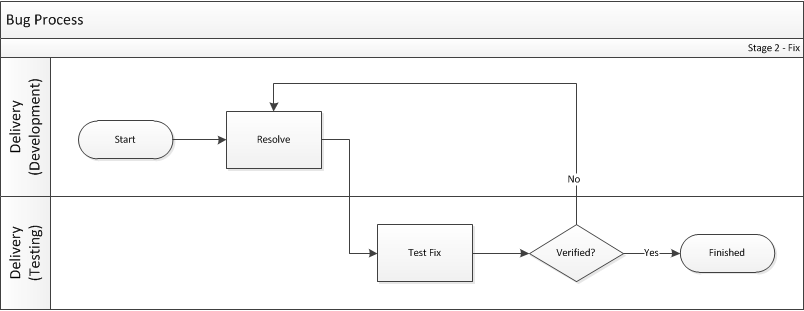
Stage 2 – Fixing


Note:  Click the process for a larger version.
 
Bugs which enter this stage should have already been through the first stage of investigation at least once and should have appropriate tasks against them which detail what needs to happen to resolve the problem.
Since each bug should have been through the first stage of analysis, we should know enough at this stage to be confident in being able to both apply a fix and complete the associated tasks in the allocated sprint.

TFS Standards Policy

Rules to organise the process of Checking in and out of TFS is vital for preserving the integrity of our solution.
 
This list is by no means fool-proof and exhaustive and hence any suggestions are welcomed and encouraged.
  1. Before Checking In or Out:
    1. Consider getting latest.
    2. Check if someone else has already checked the file out. If so, inform that person. This to avoid duplicating activities.
  2. Checking out:
    1. You can check out a file either explicitly by right clicking and select Check-out or implicitly by typing into the file.
    2. Before Checking-Out, check that the file is already checked out by another person; if so, inform that user, this to avoid duplicating activities.
  3. Checking In:
    1. Before checking in make sure:
      1. The modified code compiles.
      2. The entire solution builds successfully.
      3. StyleCop rules implemented.
      4. Code reviewer is present.
    2. Add clear and concise description to what has been changed and why.
    3. Assign to Work Item(s) ID
    4. Code reviewer name entered.
    5. Never Auto-Merge; always merge manually.
    6. Check that all new files, or relevant assembly in the global Library folder, have been successfully added to TFS. Missing such files might trigger Build Server failure.
  4. After checking in keep an eye on the Build Server notification for successful build.
  5. At the end of the working day; if the coding is not successfully completed, you must “Shelf” the files within TFS.
  6. Make sure to regularly update relevant work items with progress and relevant comment.

Singleton Pattern the right way

The singleton pattern is used in almost all modern day programming languages, so why do I keep finding it written incorrectly in so many applications, so lets start with the right way

public sealed class SimpleNoLockLazy
    {
        static readonly SimpleNoLockLazy instance = new SimpleNoLockLazy();

        // Explicit static constructor to tell C# compiler
        // not to mark type as beforefieldinit
        static SimpleNoLockLazy()
        {
        }

        SimpleNoLockLazy()
        {
        }

        public static SimpleNoLockLazy Instance
        {
            get
            {
                return instance;
            }
        }
    }

So why this implementation?   The reason for using a Singleton is for performance in a multi-threaded environment and this pattern is not only simple, but it is the fastest.  I have attached a benchmark application, which is based on Jon Skeet’s benchmark, but testing using a Parallel processes.

Benchmark.zip (9.98 kb)

I found Jon Skeet’s article very useful

Validation from WCF layer through to MVC


First off, why would you want to perform validation in the WCF layer?

After a vigorous PEN test, it was noted that the validation was mainly happening at the client browser and the application required validation to occur at the business logic layer, in our case the WCF layer.

In general, when working with an MVC/ASP.NET web application, you would typically want to do validation on the client-side as well as on the server side. Whilst the custom validation is simple enough, you’d have to duplicate it on the client and server, which is annoying – now you have two places to maintain a single validation routine.

Lets look at different validation options that will assist us in solving the issues over validation.

There are five validation approaches which you can prefer during validations. Each one has advantages and disadvantages over each other. Also, it is possible to apply multiple approaches at the same time. For example, you can implement self validation and data annotation attributes approaches at the same time, which gives you much flexibility.

  1. Rule sets in configuration
  2. Validation block attributes
  3. Data annotation attributes
  4. Self-validation
  5. Validators created programmatically

Rule sets in Configuration

In this approach, we put our validation rules into the configuration file (web.config in ASP.NET and app.config in Windows applications). Here is an example showing how to define validation rules:

<?xml version="1.0" encoding="utf-8" ?>
<configuration>
  <configSections>
    <section name="validation" type="Microsoft.Practices.EnterpriseLibrary.
	Validation.Configuration.ValidationSettings, 
	Microsoft.Practices.EnterpriseLibrary.Validation, Version=5.0.414.0, 
	Culture=neutral, PublicKeyToken=31bf3856ad364e35" requirePermission="true" />
  </configSections>
  <validation>
    <type name="ELValidation.Entities.BasicCustomer" 
		defaultRuleset="BasicCustomerValidationRules"
      assemblyName="ELValidation, Version=1.0.0.0, Culture=neutral, PublicKeyToken=null">
      <ruleset name="BasicCustomerValidationRules">
        <properties>
          <property name="CustomerNo">
            <validator type="Microsoft.Practices.EnterpriseLibrary.
		Validation.Validators.NotNullValidator, 
		Microsoft.Practices.EnterpriseLibrary.Validation"
              negated="false" messageTemplate="Customer must have valid no"
              tag="CustomerNo" name="Not Null Validator" />
            <validator type="Microsoft.Practices.EnterpriseLibrary.
		Validation.Validators.StringLengthValidator, 
		Microsoft.Practices.EnterpriseLibrary.Validation"
              upperBound="5" lowerBound="5" lowerBoundType="Inclusive" 
		upperBoundType="Inclusive"
              negated="false" messageTemplate="Customer no must have {3} characters."
              tag="CustomerNo" name="String Length Validator" />
            <validator type="Microsoft.Practices.EnterpriseLibrary.
		Validation.Validators.RegexValidator, 
		Microsoft.Practices.EnterpriseLibrary.Validation"
              pattern="[A-Z]{2}[0-9]{3}" options="None" patternResourceName=""
              patternResourceType="" 
		messageTemplate="Customer no must be 2 capital letters and 3 numbers."
              messageTemplateResourceName="" messageTemplateResourceType=""
              tag="CustomerNo" name="Regex Validator" />
          </property>
        </properties>
      </ruleset>
    </type>
  </validation>
</configuration>

Validation Block Attributes

In this approach, we define our validations through the attributes defined in Enterprise Library validation block.

[NotNullValidator(MessageTemplate = "Customer must have valid no")]
[StringLengthValidator(5, RangeBoundaryType.Inclusive, 
		5, RangeBoundaryType.Inclusive, 
		MessageTemplate = "Customer no must have {3} characters.")]
[RegexValidator("[A-Z]{2}[0-9]{3}", 
	MessageTemplate = "Customer no must be 2 capital letters and 3 numbers.")]
public string CustomerNo { get; set; }

Message template is a good way to provide meaningful messages on failure with the flexibility to be replaced by Enterprise Library validation block for brackets.

Data Annotation Attributes

In this approach, we define our validations through the attributes defined within System.ComponentModel.DataAnnotations assembly.

[Required(ErrorMessage = "Customer no can not be empty")]
[StringLength(5, ErrorMessage = "Customer no must be 5 characters.")]
[RegularExpression("[A-Z]{2}[0-9]{3}", 
	ErrorMessage = "Customer no must be 2 capital letters and 3 numbers.")]
public string CustomerNo { get; set; }

This approach is widely used in conjunction with Entity Framework, MVC and ASP.NET validations.

Self-validation

This approach gives much flexibility to us in order to create and execute complex validation rules.

In order to implement this approach, we first decorate HasSelfValidation attribute with the object type as shown in the following example:

[HasSelfValidation]
public class AttributeCustomer
{
    …
}


Then, we write our validation logic by putting SelfValidation attribute on the top of the method which executes the validations.

[SelfValidation]
public void Validate(ValidationResults validationResults)
{
    var age = DateTime.Now.Year - DateTime.Parse(BirthDate).Year;

    // Due to laws, only customers older than 18 can be registered 
    // to system and allowed to order products
    if (age < 18)
    {
        validationResults.AddResult(
            new ValidationResult("Customer must be older than 18",
                this,
                "BirthDate",
                null,
                null));
    }
}

Validators Created Programmatically

This approach is different from the others because validation rules are created programmatically and executed independent of the type.

First, we define our validation rules:

Validator[] validators = new Validator[] 
{ 
    new NotNullValidator(false, "Value can not be NULL."),
    new StringLengthValidator(5, RangeBoundaryType.Inclusive, 
	5, RangeBoundaryType.Inclusive,  "Value must be between {3} and {5} chars.")
};

Then, we add them into one of the composite validators depending on your preference.

var validator = new AndCompositeValidator(validators);

In this example, we check Value to be tested… if it is not null and it has five exact characters.

Finally, I want to mention about the validations against collections. Actually, it is similar to the validations for objects.

// Initialize our object and set the values
var customer = new AttributeCustomer();
            
FillCustomerInfo(customer);

// Create a list of objects and add the objects to be tested to the list
List<AttributeCustomer> customers = new List<AttributeCustomer>();
customers.Add(customer);

// Initialize our validator by providing the type of objects in the list and validate them
Validator cusValidator = new ObjectCollectionValidator(typeof(AttributeCustomer));
ValidationResults valResults = cusValidator.Validate(customers);

// Show our validation results
ShowResults(valResults);


First thought was to use the MVC answer to validation – DataAnnotations, so why can’t we do this?

WCF is technology for exposing services and it does it in interoperable way. Data contract exposed by the service is just create for data. It doesn’t matter how many fancy attributes you use on the contract or how many custom logic you put inside get and set methods of the property. On the client side you always see just the properties.

The reason for this is that once you expose the service it exposes all its contracts in interoperable way – service and operation contracts are described by WSDL and data contracts are described by XSD. XSD can describe only structure of data but no logic. The validation itself can be in some limited way be described in XSD but .NET XSD generator doesn’t do this. Once you add service reference to your WCF service the proxy generator will take WSDL and XSD as a source and create your classes again without all that attributes.

If you want to have client side validation you should in the first place implement that validation on the client side – it can be done by using buddy classes for partial classes used by WCF proxy. If you want to have a maintenance nightmare and you don’t want to use this way you must share assembly with your entities between your WCF client and WCF service and reuse those types when adding service reference. This will create tight coupling between your service and ASP.NET MVC application.

What about Microsoft.Practices.EnterpriseLibrary.Validation.Validators?

This is a possible solution to the WCF layer, but what this does not provide is a process to pass the validation back to the UI for JavaScript validation, which you get from DataAnnotations.

It may be worth using both the DataAnnotations and the Enterprise Library validation block together.

One question still to remain, is if the validation fails in the Services layer (WCF) how does the validation message get passed to the calling WCF client?

In general, when working with an MVC/ASP.NET web application, you would typically want to do validation on the client-side as well as on the server side. Whilst the custom validation is simple enough, you’d have to duplicate it on the client and server, which is annoying – now you have two places to maintain a single validation routine.

So what else can we use?

First of all, do not throw Exceptions as a way of validating data – that’s a way too expensive operation, instead of graceful handling of invalid data.

If you would like to see some sample code take a look at Microsoft Enterprise Library 5.0 – Introduction to Validation Block by Ercan Anlama

ELValidation_src.zip (772.17 kb)


We’ve looked at all possible validation options, now the searching question is how do pass the validation over WCF to the WCF client for validation?  to be continued……