All posts by bryan
How to test “Only certain roles should have access to a controller” in MVC
Using the TDD approach in an MVC application, I was wondering how can you ensure that only certain roles have access to the controller. Why should we test for this? Because this is a clearly defined business rule and all business rules need to have Unit Tests where possible.
This is the code, which is quite simple
[Authorize(Roles = "Administrators")]
public class AdminController : Controller
What we need to ensure is that a developer does not come along and add more roles or take away the Administrators roles.
We can do this using a Test and going through the Controller using reflection, like this:
[TestMethod]
public void AdminControllerShouldOnlyAvailableToAdministrators()
        {
            // Arrange
            var attributes = typeof(AdminController).GetCustomAttributes(true).ToList();
            var countNonAdministrator = 0;
            var countAdministrator = 0;

            // Act
            foreach (var attribute in
                attributes.Where(attribute => attribute.GetType() == typeof(AuthorizeAttribute)).Cast<AuthorizeAttribute>())
            {
                countNonAdministrator = attribute.Roles.Split(',').ToList().Count(role => role.ToString() != "Administrator");
            }

            foreach (var attribute in
                attributes.Where(attribute => attribute.GetType() == typeof(AuthorizeAttribute)).Cast<AuthorizeAttribute>())
            {
                countAdministrator = attribute.Roles.Split(',').ToList().Count(role => role.ToString() == "Administrator");
            }

            // Assert
            Assert.IsTrue(countNonAdministrator  == 0, "Administrators are only allowed to be authorised to use this controller");
            Assert.IsTrue(countAdministrator == 1, "You must only have Administrators to be authorised to use this controller");
        }
The repository layout
Team Foundation Server provides the ultimate flexibility in terms of how you arrange our data. Because it simply versions directories and files, and because it describes no particular meaning to any of those objects, you may arrange the data in your repository in any way that we choose. Unfortunately, this flexibility also means that it’s easy to find yourself “lost without a roadmap” as you attempt to navigate different Team Foundation Server project repositories that may carry completely different and unpredictable arrangements of the data within them.
To counteract this confusion, you can using a repository layout convention (established long ago) in which a handful of strategically named Team Foundation Server repository directories convey valuable meaning about the data they hold. Most projects have a recognizable “main line”, or trunk, of development; some branches, which are divergent copies of development lines. So we first recommend that each project have a recognizable project root in the repository, a directory under which all of the versioned information for that project—and only that project—lives. Secondly, I suggest that each project root contain a trunk subdirectory for the main development line, a branches subdirectory in which specific branches (or collections of branches) will be created.
In our case branches will contain the developers name followed by the TFS task item they are working on. This makes it very clear at any time who and what was required.
Trunk would be the main body of development, originating from the start of the project until the present.
Branches will be a copy of code derived from a certain point in the trunk that is used for applying major changes to the code while preserving the integrity of the code in the trunk. If the major changes work according to plan, they are usually merged back into the trunk.
Shelve Pending Changes stores your code changes on the server but doesn’t commit them to the branch. Here are some reasons for using it:
- To save changes but undo locally when I’m not ready to commit changes but I need to make an emergency bug fix on the same branch.
- To store code for code reviews prior to committing. Other people can check out or view your shelved changes.
- To store changes that are ready for committing when the changes aren’t approved yet.
One thing to know about shelving changes: When you unshelve, you get the file as-is. If someone else has modified the file after your shelve, no merge happens. So I don’t recommend shelving changes long-term.
Here are some examples of the structure
$abc\src\csp\branches\David Jason\3243
$abc\src\csp\branches\David Jason\3122
The repository main root has the following structure and shortened names, this is because Visual Studio has a 260 character name length restriction.
src Source Code
dep Deployments
If you are making a large Branch it is recommended that you plan you merge back to your trunk when you branch, as the longer period of time the Branch is separated from the Trunk the more work is going to be required to merge the two back together. As a rule of thumb one week is acceptable where as one month is much too long and will result in a lot of merge conflicts. If the branch is out of the main trunk for more than a month then before the code is merged back to the main trunk full testing of the source will be required, both unit tests and system integration testing which will require to be signed off by the test team that it passes full regression testing before the code is merged back to the main trunk.
With larger branches they can have their own trunk and branches while they are being worked on. If a sub trunk has been created then it is best practice to make sure a build is triggered on all checkins to this trunk to ensure that the code can be build successfully on the build server. It is important that the above paragraph on merging back is adhered to.
SQL Performance Profiler for SQL Express
I came across this smart little Profiler for SQL Express, or any version of SQL as it happens.
Microsoft SQL Server family includes free Express edition, that is fully functional, however has some disappointing limitations which prevent from using it in development process. One of them is absense of profiling tools, standard SQL profiler is not included. However, I came across this SQL Performance Profiler to use with the express edition for tuning your system.
SQL Server Express Edition Profiler provides most of functionality standard profiler does, such as choosing events to profile, setting filters, etc.
It is a small fee of about $5 for three licences, which is well worth the money.
Search every SQL table for a string
Here is some neat SQL to allow you to search every table and every field in the database for a string
CREATE TABLE myTable99 (TABLE_NAME sysname, COLUMN_NAME sysname, Occurs int)
GO

SET NOCOUNT ON

DECLARE @SQL varchar(8000), @TABLE_NAME sysname, @COLUMN_NAME sysname, @Sargable varchar(80), @Count int

SELECT @Sargable = 'There are too many subscription products resulting from the supplied request data'

DECLARE insaneCursor CURSOR FOR
      SELECT c.TABLE_NAME, c.COLUMN_NAME
        FROM INFORMATION_SCHEMA.Columns c INNER JOIN INFORMATION_SCHEMA.Tables t
          ON t.TABLE_SCHEMA = c.TABLE_SCHEMA AND t.TABLE_NAME = c.TABLE_NAME
      WHERE c.DATA_TYPE IN ('char','nchar','varchar','nvarchar','text','ntext')
         AND t.TABLE_TYPE = 'BASE TABLE'

OPEN insaneCursor

FETCH NEXT FROM insaneCursor INTO @TABLE_NAME, @COLUMN_NAME

WHILE @@FETCH_STATUS = 0
      BEGIN
            SELECT @SQL = 'INSERT INTO myTable99 (TABLE_NAME, COLUMN_NAME, Occurs) SELECT '
                        + '''' +  @TABLE_NAME + '''' + ','
                        + '''' + @COLUMN_NAME + '''' + ','
                        + 'COUNT(*) FROM [' + @TABLE_NAME
                        + '] WHERE [' + @COLUMN_NAME + '] Like '
                        + ''''+ '%' + @Sargable + '%' + ''''
            --SELECT @SQL
            EXEC(@SQL)
            IF @@ERROR <> 0
                  BEGIN
                        SELECT @SQL
                        SELECT * FROM INFORMATION_SCHEMA.Columns WHERE TABLE_NAME = @TABLE_NAME
                        GOTO Error
                  END
            FETCH NEXT FROM insaneCursor INTO @TABLE_NAME, @COLUMN_NAME
      END

SELECT * FROM myTable99 WHERE Occurs <> 0


Error:
CLOSE insaneCursor
DEALLOCATE insaneCursor

GO

DROP TABLE myTable99
GO

SET NOCOUNT OFF
Switching from iPhone to Android
The iPhone is the top smartphone, but some Android rivals like the Galaxy S III are very attractive, and they’re available in large sizes that the iPhone is not. Plus, they support cool technologies Apple doesn’t support.
If you’re ensconced in the Apple fold, you may believe you have to stay all-Apple. It turns out that you can bring Android largely into the Apple ecosystem.
Getting iCloud email
Apple’s iCloud sync and cloud storage service is one of iOS’s and OS X’s key attractions. But Apple keeps it in the family to encourage people to commit. However, you can access iCloud email from the standard Android Email app.
The key is to sign in using your iCloud account’s me.com address, not your icloud.com address. The incoming server is mail.me.com, and the outgoing server is smtp.me.com. SSL should be on.
Syncing iCloud contacts and calendars
iCloud’s auto-syncing contacts and calendars make it supereasy to keep your Mac, iPhone, and iPad up to date with each other. They even work with Windows — but not Android.
That is, unless you buy two utilities for £3.75 each from developer Marten Gajda: Smoothsync for Cloud Calendar and Smoothsync for Cloud Contacts. Both are available in the Google Play app store.
Sign in with your iCloud credentials, and your Android smartphone is now part of the iCloud family.
Syncing documents
Apple’s iCloud Documents feature in iOS — recently brought to OS X — can be very handy for keeping documents in sync across all devices you use to access or edit them. It’s an Apple-only feature for which there is no way to gain foreign access.
But that’s OK. iCloud Documents is quite limited, requiring the same app on each device to read a particular file type. Many apps in iOS aren’t on OS X, such as OS X’s TextEdit text editor, so iCloud Documents often can’t do the job.
You should use Google Drive or DropBox instead; many iOS apps support them natively, and they work on pretty much every mobile and desktop OS today.
Syncing bookmarks and open URLs
Apple’s Safari 6 in iOS, OS X, and Windows has a neat feature called iCloud Tabs that syncs the URLs of all open tabs to all other devices using Safari 6 tied to the same iCloud account. Bookmarks are also synced across these three OSes.
Again, there’s no way to open up Safari’s iCloud tabs and bookmark syncing to Android — so don’t use Safari. Google’s Chrome browser has a similar sync capability, and it’s available for Android, iOS, OS X, and Windows. (Firefox can also sync across platforms, but recently dropped its iOS sync app; it’s not an option if you’re using an iPad or other iOS device.)
Find a lost or stolen smartphone
Another great iCloud feature is Find My iPhone, which tracks your iOS and OS X devices, so you can find them on a map, send an alert (in case your phone is hidden under a blanket, for example) or message, and lock or wipe them if necessary. Just be sure you set the device so that a thief can’t turn off this feature. Again, Android can’t join in.
But there’s a comparable service called Lookout that lets you find, lock, or wipe a missing Android device from any browser. The basic version is free. However, be warned that it’s easy for a thief to disable it if he or she notices it’s installed.
Syncing with iTunes
One of Apple’s stickiest technologies is iTunes, which is both a library for your entertainment and store from which to get more of it. Google’s free Music Manager app for Windows and OS X syncs nonprotected music wirelessly to your Google Play account, but it must be streamed to your Android device.
A better choice is the free DoubleTwist Player app, which syncs music, videos, and photos. Also, it can transfer these items from iOS device to Android. You need both the Android client and OS X or Windows client. Note that DoubleTwist is full of come-ons for in-app upgrades — annoyingly so. The $5 AirSync add-on is worthwhile, as it allows Wi-Fi syncing between your computer and Android device.
Streaming to AirPlay
Apple TV is an insidiously useful device, acting as a wireless bridge between Macs and iOS devices for screen mirroring and streaming of movies, music, podcasts, and photos. It too is an Apple-only technology.
But the £5 AirSync add-on utility for DoubleTwist lets you stream music and videos from an Android device to the Apple TV, just as if it were an iPhone or iPad. When it works, that is — I often could not get the AirTwist streaming icon to appear, and I never did figure out why.
Managing book libraries
iTunes includes the iBookstore, which lets you buy e-books for reading on the iBooks app on an iPad or iPhone, but iBooks doesn’t work on other devices, not even Macs. Except for the special Multi-Touch e-book format for the iPad, it’s not a great bookstore to use.
Amazon.com’s Kindle app is a better choice, as it works on every major mobile and desktop platform, and its book selection is much larger than Apple’s.
Getting directions
Everyone knows by now that iOS 6’s Apple Maps has major flaws, and Apple has apologized for them. Plus, it provides voice navigation only on an iPhone 4S or iPhone 5. Compare that to Android, whose navigation app has worked well for several years on all Android devices.
But an even better option is the free Waze app; it’s available for both iOS and Android. It provides voice navigation on older iPhones, too.
Getting apps
It’s a cliché, but a true one: In iOS, there’s (very likely) an app for that. Android has a smaller app selection. But you’ll find that content apps and services apps (such as for banking, public transit, and airlines) are almost always available for Android if available for iOS. Ditto for basic utilities such as flashlights, social media, restaurant finders, and bar-code scanners.
Have I gone to the dark side and switched over yet, no, I’m still running my iPhone 4s and Google Nexus 4 together. So I’m still sitting on the fence, perhaps the Samsung 4 will tip me over, we’ll just have to wait and see.
Disable Shut Down on your Server
When you are connecting via a remote connection to a server I find the Shut Down is far far to close to the log off, and if you hit the Shut Down by mistake it can be a devil to get the remote machine to power back up and may require someone to visit the machine to hit the power button.
You can disable the Shut Down button there is a group policy settings for this, start gpedit.msc on the machine or use a domain policy to configure User Configuration – Administrative templates – Start menu. See the setting “Remove and prevent access to the shut down, restart….”, change it to enabled.
No more shutting down by accident.
Deploy a database project with TFS Build
When you develop web application you often have this scenario. Some people are testers, they are testing the application in dev all day, and they want always to test latest version. Moreover testers usually fills data into web application, so they want their data to be preserved between various deploy. If you simply clear all data in test database you will end with a lot of furious tester so do not even think to do this.
If a developer needs to change database schema, we need to automate not only the deploy of the web application, but we need also to sync test database with the latest changes. This is necessary so the test site can work with the new version, but old data is preserved for the happiness of the testers.
This is quite simple using TFS and Database project. The situation is this one
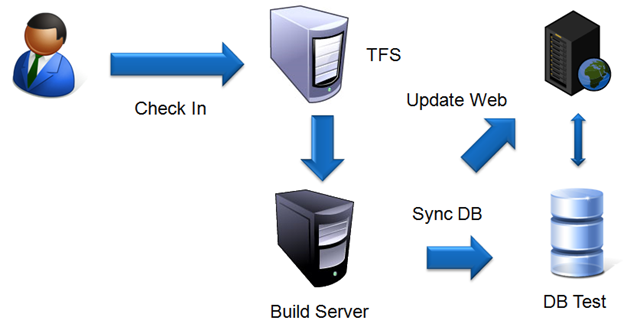
When a developer does a check-in, the build server grabs the tip from TFS, then it runs the builds script and deploy the new version of the site in the test web server. At the same time test database gets updated with the latest database schema.
Next we need the ability to automatically deploy changes to a specific database, this task is quite simple and you can find some details here in msdn, but we need to insert this command into the msbuild script. Here is the code:
<Target Name="AfterDropBuild"><Message Text="Deploy of project database" />
<MSBuild Projects="$(SolutionRoot)srcDbEditionNorthwindTestNorthwindTestNorthwindTest.dbproj"
Properties="OutDir=$(DropLocation)$(BuildNumber)debug;
TargetDatabase=NorthwindCiTest;
DefaultDataPath=C:Program FilesMicrosoft SQL ServerMSSQL.4MSSQLData;
TargetConnectionString=Data Source=VM2003R2_1SQLTEST%3Buser=sa%3Bpwd=Pa$$w0rd;
DeployToDatabase=true;"
Targets="Deploy"/>
</Target>
Original post from Ricci Gian Maria
http://geekswithblogs.net/jakob/archive/2012/04/25/deploying-ssdt-projects-with-tfs-build/
Visual Studio 2012 running slow
Three months in and my Visual Studio 2012 is running slow, I’ll even go as far as saying it is freezing up some times, so I loaded up SysInternals Process Monitor and set a filter on Visual Studio and to my complete and utter amazement I found PerfWatson running wild in the system
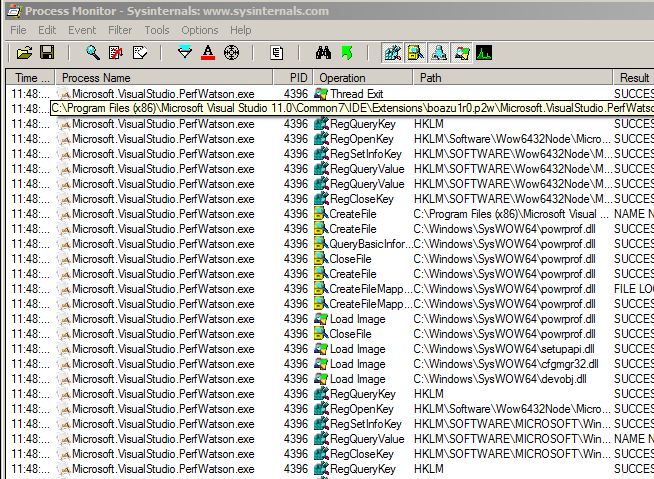
PerfWatson is designed to drive performance improvements and make Visual Studio faster by automatically reporting back to Microsoft, this sounds great but it is just running crazy on my machine and I need to take it off.
To take it off you need to be in Visual Studio 2012, if you can get it loaded, then go to the Tools/Extensions and Updates sections and you’ll find Visual Studio PerfWatson installed, just uninstall and it will be gone.
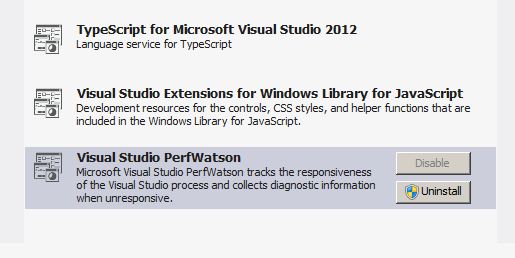
Another area to clear out is the WebSiteCache, which Kevin Rintoul wrote about on his blog Slow Visual Studio Performance … Solved!, which can be found at:
C:\Users\jQuery152010256510121984808_1361448287186jQuery152010612401940409233_1361449184152jQuery15207433351762976833_1361449212578??\AppData\Local\Microsoft\WebsiteCache
If you are using TFS with Visual Studio then another great tip from Nick on his blog post How to fix slow Visual Studio + TFS,
Edit the Visual Studio config file found in C:\Program Files (x86)\Microsoft Visual Studio 11.0\Common7\IDE\devenv.exe.config
and locate the following line:
<system.net>
Right below (above settings, NOT under), insert the following line of code:
<defaultProxy enabled="false" />
Your visual studio should now be more responsive!
Anyone else got any tips to increase the performance of Visual Studio 2012 are most welcome.
Who is locking my SQL database?
Need to know who is logged on to your SQL database ,here is a nice script that I got from Gary Dunne
DECLARE @spid1 int = NULL      /* server process id to check for locks */
DECLARE @spid2 int = NULL       /* other process id to check for locks */

set nocount on
/*
** Show the locks for both parameters.
*/
declare @objid int,
   @dbid int,
   @string Nvarchar(255)

CREATE TABLE #locktable
   (
   spid       smallint
   ,loginname nvarchar(20)
   ,hostname  nvarchar(30)
   ,dbid      int
   ,dbname    nvarchar(20)
   ,objId     int
   ,ObjName   nvarchar(128)
   ,IndId     int
   ,Type      nvarchar(4)
   ,Resource  nvarchar(16)
   ,Mode      nvarchar(8)
   ,Status    nvarchar(5)
   )

if @spid1 is not NULL
begin
   INSERT #locktable
      (
      spid
      ,loginname
      ,hostname
      ,dbid
      ,dbname
      ,objId
      ,ObjName
      ,IndId
      ,Type
      ,Resource
      ,Mode
      ,Status
      )
   select convert (smallint, l.req_spid)
      --,coalesce(substring (user_name(req_spid), 1, 20),'')
      ,coalesce(substring (s.loginame, 1, 20),'')
      ,coalesce(substring (s.hostname, 1, 30),'')
      ,l.rsc_dbid
      ,substring (db_name(l.rsc_dbid), 1, 20)
      ,l.rsc_objid
      ,''
      ,l.rsc_indid
      ,substring (v.name, 1, 4)
      ,substring (l.rsc_text, 1, 16)
      ,substring (u.name, 1, 8)
      ,substring (x.name, 1, 5)
   from master.dbo.syslockinfo l,
      master.dbo.spt_values v,
      master.dbo.spt_values x,
      master.dbo.spt_values u,
      master.dbo.sysprocesses s
   where l.rsc_type = v.number
   and   v.type = 'LR'
   and   l.req_status = x.number
   and   x.type = 'LS'
   and   l.req_mode + 1 = u.number
   and   u.type = 'L'
   and   req_spid in (@spid1, @spid2)
   and   req_spid = s.spid
end
/*
** No parameters, so show all the locks.
*/
else
begin
   INSERT #locktable
      (
      spid
      ,loginname
      ,hostname
      ,dbid
      ,dbname
      ,objId
      ,ObjName
      ,IndId
      ,Type
      ,Resource
      ,Mode
      ,Status
      )
   select convert (smallint, l.req_spid)
      --,coalesce(substring (user_name(req_spid), 1, 20),'')
      ,coalesce(substring (s.loginame, 1, 20),'')
      ,coalesce(substring (s.hostname, 1, 30),'')
      ,l.rsc_dbid
      ,substring (db_name(l.rsc_dbid), 1, 20)
      ,l.rsc_objid
      ,''
      ,l.rsc_indid
      ,substring (v.name, 1, 4)
      ,substring (l.rsc_text, 1, 16)
      ,substring (u.name, 1, 8)
      ,substring (x.name, 1, 5)
   from master.dbo.syslockinfo l,
      master.dbo.spt_values v,
      master.dbo.spt_values x,
      master.dbo.spt_values u,
      master.dbo.sysprocesses s
   where l.rsc_type = v.number
   and   v.type = 'LR'
   and   l.req_status = x.number
   and   x.type = 'LS'
   and   l.req_mode + 1 = u.number
   and   u.type = 'L'
   and   req_spid = s.spid
   order by spID
END
DECLARE lock_cursor CURSOR
FOR SELECT dbid, ObjId FROM #locktable WHERE Type ='TAB'

OPEN lock_cursor
FETCH NEXT FROM lock_cursor INTO @dbid, @ObjId
WHILE @@FETCH_STATUS = 0
   BEGIN
   SELECT @string =
      'USE ' + db_name(@dbid) + char(13)
      + 'UPDATE #locktable SET ObjName =  object_name('
      + convert(varchar(32),@objId) + ') WHERE dbid = ' + convert(varchar(32),@dbId)
      + ' AND objid = ' + convert(varchar(32),@objId)

   EXECUTE (@string)
   FETCH NEXT FROM lock_cursor INTO @dbid, @ObjId
   END
CLOSE lock_cursor
DEALLOCATE lock_cursor

SELECT * FROM #locktable
DROP TABLE #locktable