Category Archives: Uncategorized

How to get an EULA displayed for your clickonce application

Stuck with this issue, if needing a ClickOnce installation to display an EULA, I final found a solution, on MSDN

Here’s a round about way to get your clickonce applications to install with an End user license agreement. Basically you build a redistributable component that can be seen in your prerequsites dialog box under the publish window. This allows a nice way to have all your apps reuse the same agreement, if you want. It’s very easy, you need only to create three files (“eula.txt”, “product.xml”, and “package.xml”) and two folders in this case (“EULApackage”, and “en”). I documented everything below on how I set mine up. it works great. the only thing you’ll have to change is the Name of the component and of course you’ll need your own end user licence agreement saved as eula.txt. The component needs to be put in the following path:

Visual Studio 2005

C:\Program Files\Microsoft Visual Studio 8\SDK\v2.0\BootStrapper\Packages

Visual Studio 2008

C:\Program Files\Microsoft SDKs\Windows\v6.0A\Bootstrapper\Packages

in this folder you should see some sub folders for other redistributable components. First make a new sub directory for your component. I called mine EULApackage. in this new folder you need the following. -A file called product.xml and a sub folder called “en” (for english) you can do various things with the product.xml file, but here’s the way mine looks

<?xml version="1.0" encoding="utf-8" ?>

<Product
 
xmlns="http://schemas.microsoft.com/developer/2004/01/bootstrapper"
 
ProductCode="EULA.Bootstrap.Component"
>
 
<!-- Defines list of files to be copied on build -->
 
<PackageFiles>
   
<PackageFile Name="en/eula.txt"/>
 
</PackageFiles>

 
<Commands>
   
<Command PackageFile="en/eula.txt"
     
Arguments='' >
       
<ExitCodes>
<ExitCode Value="0" Result="Success"/>          
<DefaultExitCode Result="Fail" FormatMessageFromSystem="true" String="GeneralFailure" />
       
</ExitCodes>
   
</Command>
 
</Commands>
</Product>

*in this case the file eula.txt was the text file that was my license agreement. Note that it’s not an rtf file. Rtf won’t display propertly using this method.

Now inside my “en” subfolder i put the eula.txt file and another xml file called package.xml, again this xml file can be used to do all kinds of stuff

heres the contents of my version*


 <?xml version="1.0" encoding="utf-8" ?>

<Package
 
xmlns="http://schemas.microsoft.com/developer/2004/01/bootstrapper"
 
Name="DisplayName"
 
Culture="Culture"
 
LicenseAgreement="eula.txt">

   
<PackageFiles>
       
<PackageFile Name="eula.txt"/>
   
</PackageFiles>

 
<!-- Defines a localizable string table for error messages and url's  -->
 
<Strings>
   
<String Name="DisplayName">Companies End User License Agreement</String>
   
<String Name="Culture">en</String>

   
<String Name="CancelFailure">User Failed to Accept Companies End User License Agreement.</String>
   
<String Name="GeneralFailure">A fatal error occurred during the installation of ELUA Component Execution</String>
   
<String Name="AdminRequired">You do not have the permissions required to install this application.  Please contact your administrator.</String>
 
</Strings>    
</Package>

Note: whatever you put in the DisplayName field is what your user will see when he’s confronted with the eula text If you have all this put together correctly and in the right folders, the next time you start up VS2005 and go to your publish tab -> prerequisites you should see the DisplayName field. Just check this as a prerequisite for you app. when the user clicks install on the publish.htm file it’ll present the user with the conents of your eula.txt file inside of a standard license acceptance dialog box. if the choose accept your stuff installs, if they decline then it exits rather nicely and nothing is installed on their systems. If you mess up the formatting for either of the two files or if you leave out the “en” sub folder then the component won’t show up in the prerequisites dialog (when publishing)

Additional notes: although this works great it is a round about method and their are ways around the eula, such as if your publish.htm file allows them to run the application directly (I guess without the bootstrapper starting)but if they click the install button it will run. This also has the benifits of not running every time you publish an update to your clickonce application. They have to run the boot strapper to get the eula to show up (by clicking the install button on publish.htm) I figured out this method by looking at some of the other redistributable components that were already in the path

Visual Studio 2005

C:\Program Files\Microsoft Visual Studio 8\SDK\v2.0\BootStrapper\Packages

Visual Studio 2008

C:\Program Files\Microsoft SDKs\Windows\v6.0A\Bootstrapper\Packages

You can look in those other components product.xml and package.xml files to see what cool things they’ve done with them.


If you are using Visual Studio 2008, you can also set up your project file to include the Package, here is an example below

<BootstrapperPackage Include="EULA.Bootstrap.Component">
  <Visible>False</Visible>
  <ProductName>RPS End User License Agreement</ProductName>
  <Install>true</Install>
</BootstrapperPackage>
Integration Test using the MembershipProvider

Creating tests is a very important part of the development cycle, one of the import part of creating tests is to make sure the tests have as little dependencies as possible, this is where Intergration testing comes in to play.

One area to Integration test is the Membership Provider and Role Provider, this is quite simple as the interfaces ofr both providers are very well defined.

I have attached two Integration test Providers, one for the Membership and the other for Roles, So as to keep Visual Basic alive I’ve written this source in VB.NET

IntegrationTest MembershipProvider.vb (6.24 kb)

IntegrationTestRoleProvider.vb (4.36 kb)

Of course the next step would be to Mock these objects

Yeald

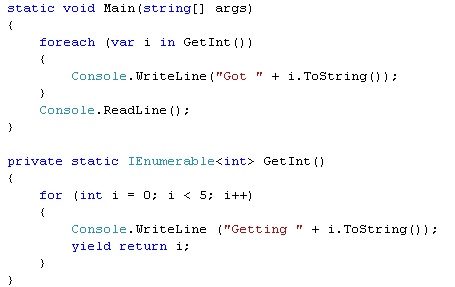
Okay, I’ve learn’t something new today, so I’d thought I would share it with you, it’s the yeald keyword, the reason why I think I have not used or know about it before is that it is used for an IEnumerable collection, which has come more in to play with LINQ, here is a short example of how it can be used:


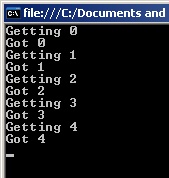
This generates the following output:


It just makes sense to do it this way, much cleaner and much more efficient.

For more details check of MSDN on yeald.

It’s worth noting that Yield is not support with VB.NET


Configuration for NLog

When I am writing an application it is so important to make sure you record and log information correctly, there are a number of free loggers you can use

I have come to use NLog, by Jaroslaw Kowalski, it’s so easy to use and get up and running, which is what you really need if you are using a logger of any type.

But what is the best practice when using a log in a live environment?

Or more importantly what and how do you configure you configuration file to make sure you are logging all your information?

The way I see it is, capture your logging to the Event Log and a Database for information and tracing.

When it comes to Errors and Fatal logging then, write it to as many places as you can, an Error file, the Event Log, a Database Log, and perhaps a special Exception Database Log, because if something has failed, you’ll want to shout about it, and you want to record it in as many places as possible.

Here is an example of an NLog configuration

NLog.config (2.63 kb)

To setup the database use the following creation creation script

NLogDatabase.sql (1.16 kb)

Make sure within the SQL Database you have a user “nloguser”, with a password of “nlogpassword”, these are both defined in the NLog configuration file, and can be changed if need be.

That is it, all you have to do now is wait for your live application to log some information.

I am sure there are a few other configuration options available and I welcome anyones comments on how to improve this configuration file.

Finding if any records exist in a table

When you need to find if any records exist in a table or a selective snap shot of a table, you are prehaps like me in using the COUNT(*) SQL transaction and see if there are zero counts, but is this the most efficient method?

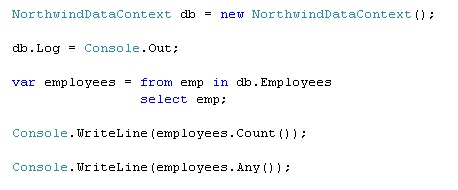
After a performance issue on one of my applications I found a new extension to LINQ to SQL called ANY(), from Ray Booysen on StackOverflow, here is an example of the SQL that is generated from LINQ:

The Results:

SELECT COUNT(*) AS [value] FROM [dbo].[Employees] AS [t0]

9

SELECT (CASE WHEN EXISTS(SELECT NULL AS [EMPTY] FROM [dbo].[Employees] AS [t0]) THEN 1 ELSE 0 END) AS [value]

True

As you can see LINQ wins the day again.

TFS, SoureSafe or Subversion

Quite often when I start at a new client they ask me what are the benefits of TFS (Team Foundation Server), as they can not justify the cost, as it is very confusing (like may of Microsoft pricing structures)

I found this about “How much does Team Foundation Server REALLY cost vs SourceSafe?” by Eric Nelson, which is just what I have been looking for, as you can see the cost is not that much more than SourceSafe, and you gain huge benefits from TFS, as it is not just a Source Control, it’s much much more.

Method for retrieving movie posters

A couple of weeks ago I released an online TV guide for Danish viewers called ifjernsyn.dk. The goal was to make a very simple overview that could easily be accessed from a mobile phone and customized by any visitor without any login. The purpose was to always know what’s on the air right now and what programs will shortly follow – and of course to keep it simple.

Since the release, some people have asked me about how I did some of the things and one of the most frequently asked questions was how to find movie posters for all the movies. Apparently, people are interested in finding movie posters for their own pet projects involving their own media collection or even a media center plug-in.

The code

With only the name of a movie, the code will search the Yahoo image search API and return a thumbnail of the poster. The API returns an XML document with both the thumbnail and the full image, so to get the full image you should just change the XPath navigation.

private const string LINK =“http://search.yahooapis.com/ImageSearchService/V1/imageSearch?appid=YahooDemo&query={0} movie&results=1”;


public static string FindMoviePoster(string title)

{

  string url = string.Format(LINK, HttpUtility.UrlEncode(title));


  XPathDocument xd = new XPathDocument(url);

  XPathNavigator navigator = xd.CreateNavigator();

  navigator.MoveToFollowing(XPathNodeType.Element);

  navigator.MoveToFirstChild();

  navigator.MoveToFirstChild();


  do

  {

    if (navigator.LocalName == “Thumbnail”)

    {

      navigator.MoveToFirstChild();

      return navigator.Value;

    }

  } while (navigator.MoveToNext());


  return null;

}

The implementation

To use the method above in your own web page, simply pass a movie title to the method and the image URL is returned. It could look like this:

string posterUrl = FindMoviePoster(“independance day”);;

if (!string.IsNullOrEmpty(posterUrl))

{

  imgPoster.ImageUrl = posterUrl;

}

The reason to use the Yahoo API is because it provides the thumbnails as well as the full image.