Category Archives: Uncategorized

My Theme made it in to the BlogEngine Themes

After my work creating the Mad Tri web site, I submitted the theme it to the BlogEngine team a few months ago and they have included it in their Theme pack, what a lovely surprise.

The BlogEngine team are going to be working hard over Christmas, with updating the BlogEngine and release a new release. more…

I too are going to the working over the Christmas on an Enhanced Newsletter and a Resource Editor to enable changes to Internationalization from the web, power to the BlogEngine 

Page Notifications

The purpose of the class is to allow the application to display information to the end user.

All that is required is for the calling application to set the Message in the PageNotifications class, e.g.

GradWeb.Web.Core.PageNotifications.Message= "Hello Page Notifier";

The theme of the application will handle the rest, as the design will have positioned and created CSS information to display the message.

Over the course of a page you can add as many message as you like and then will be added to the message.

NOTE

When the page is reloaded the message/'s will be reset.

Edit

Design Considerations

The Page Notification control produces the following HTML

<div class="notificationgroup"><div class="notification">Hello Page Notifier</div><div class="notification">Message 2</div></div>

In order to change the look and feel you will require the following style sheet information

notificationgroup{}notification{}

LINQ to SQL and Paging

Oh how I remember those days of page through data, using a GridView controller, or any other controller, lots of coding and so easy to make a mistake.

Just take a look at http://www.unboxedsolutions.com/sean/archive/2005/12/28/818/ by Sean Chase, and you will see what I mean.

Things have moved on a bit since those days, and now we have LINQ it is much easier, both directly feeding from LINQ or via methods, both provide the same result.

Linq DataSource 

Here is how to enable paging directly to LINQ, by using the LinqDataSource

How easy could it be?

Linq Methods 

When it comes to generating your own method you can do this with just a little more coding and take advantange of the Linq Skip and Take methods, the sample below provides an example using a Method. 
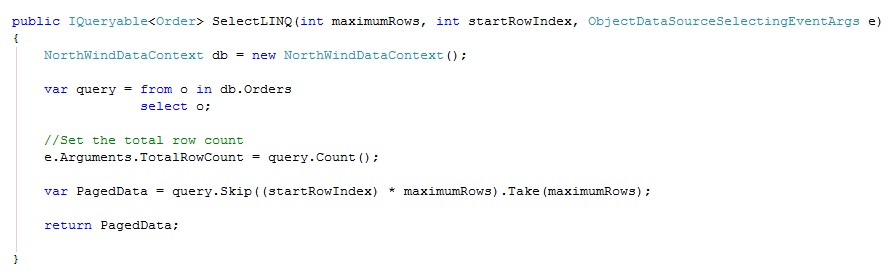


To use this fully you will need to make a few changes to the webpage, as shown below:

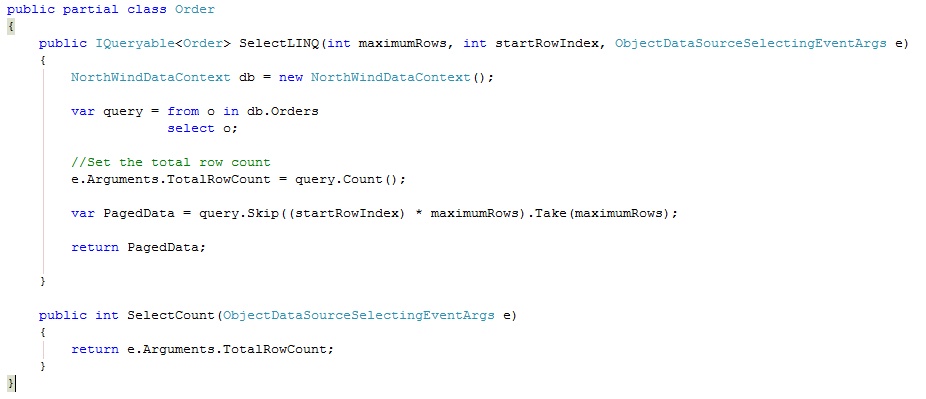
Now that you have everything set on the page all that is left is the code behind and the methods, I am using the partial class in the example, but it does not have to be.

Code Behind

Methods 
 

To ensure that the application is Paging correctly I found running the SQL Profiler on the database made sure that only the data page was being returned and nothing else, you may want to perform your own tests too.

I have included a small application using Visual Studio 2008 and .NET 3.5, all you will need to change is the connection string settings to the NorthWind database. 

GridPerformance.zip (16.46 kb)

C# 4.0 Dynamic Language

With C# 4.0 going to include Dynamic Language programming, the reports and demos I have seen to date look very impressive.

The only main implementation and useful application was to connect to COM objects, or more to the point to Microsoft Office as this is pure COM, and always been really hard to connect and work with. 

I've also seen a demo of using the Dynamic Language to build your own .NET compiler on the fly, so building and running C# code from your own application, how cool is that?

With Dynamic Language for C#, COM should be eaiser to work with.

Microsoft have release the Dynamic Language Runtime on CodePlex so we can start to play with the new features before they are release in C# 4.0