Two great videos from Hillel Coren, a 20 minute crash course reviewing the essentials of computer programming.
Don’t thank me thank Hillel
Two great videos from Hillel Coren, a 20 minute crash course reviewing the essentials of computer programming.
Don’t thank me thank Hillel
I’ve been working with TFS for sometime and when you are using the process flows you need to understand how the workflows work with the work items types.
There are two main types I have worked with Agile and CMMI Process Improvements.
I’m not an expert on these workflows but you can get access to the full guidance from:
The diagrams below are taken from VSTS blog site, but you must remember thes eare just starting points and they can be changed to suit your own workflow within your business
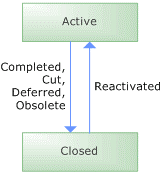
featuring 5 work item types: Bug, Requirement, Quality of Service Requirement (QoS), Risk and Task.
Work Item Type: Bug
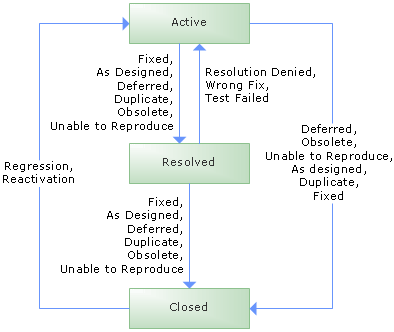
Work Item Type: Scenario
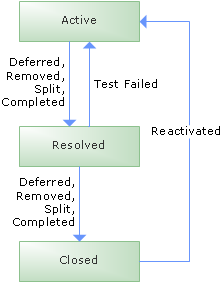
Work Item Type: Quality of Service Requirement (also known as “technical requirement”)
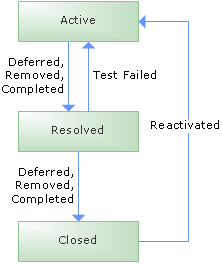
Work Item Type: Risk
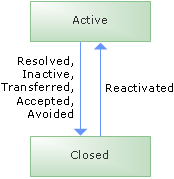
Work Item Type: Task
featuring 7 work item types: Bug, Requirement, Change Request, Issue, Review, Risk, Task
Work Item Type: Bug
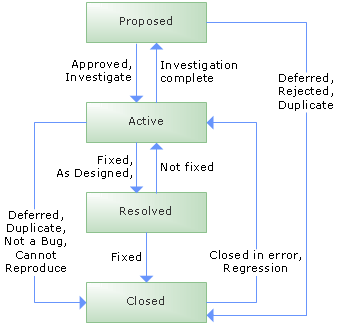
Work Item Type: Requirement
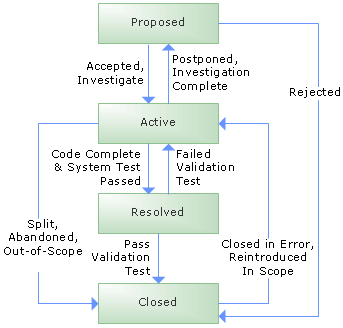
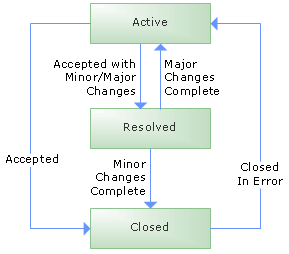
Work Item Type: Change Request
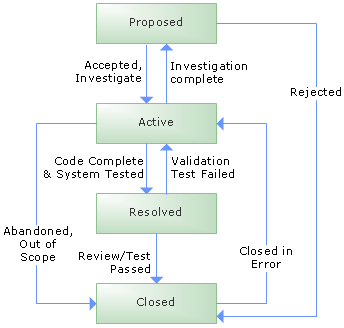
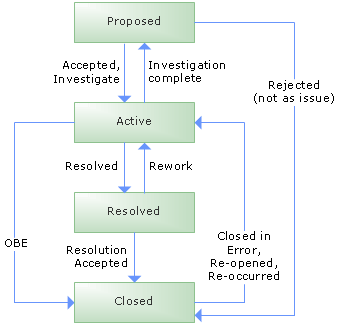
Work Item Type: Issue
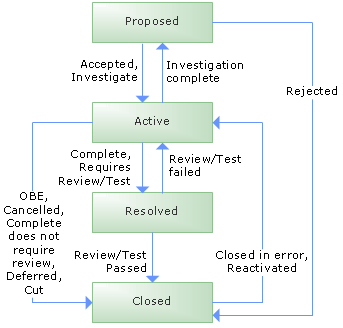
Work Item Type: Review
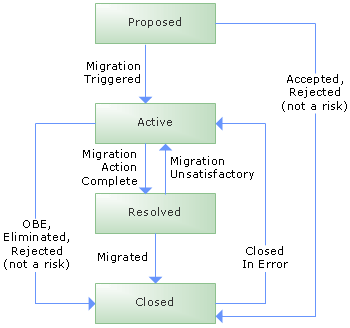
Work Item Type: Risk
Work Item Type: Task
When I come to amend a table in SQL Server all is fine until you come to save the new structure you end up getting the following message:
“Saving changes is not permitted. The changes you have made require the following tables to be dropped and re-created. You have either made changes to a table that can’t be re-created or enabled the option Prevent saving changes that require the table to be re-created.”
This is happening because ““Prevent saving changes that require table re-creation” option is enabled. You can disable this by going into Tools -> Options -> Designers-> Uncheck “Prevent saving changes that require table re-creation”, this is either in Visual Studio or SQL Management Studio.
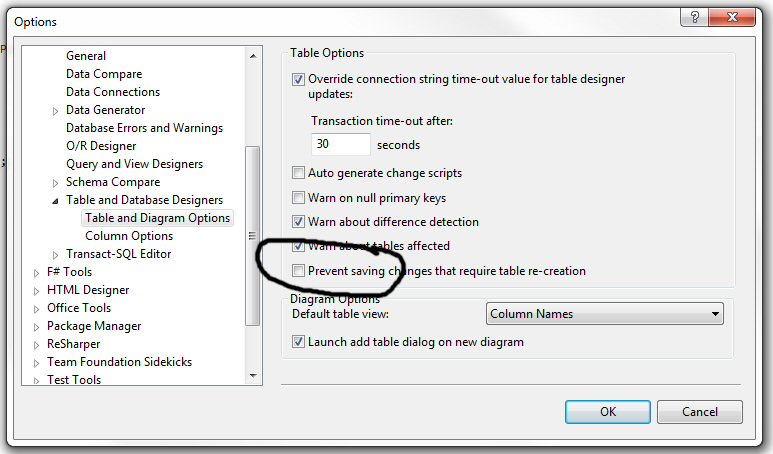
Now you can apply your new changes to the table
LINQ to SQL is a very easy to use and very powerful tool for many things when dealing with SQL. But the time has come that I need to wrap it all up and use an iRepository pattern. I’ve Googled for the IRepository and found a few useful references but none that will complete my picture. How ever I did get some good ideas when looking around othe rimplementation of the IRepository pattern that others had implmented.
So why whould I use the iRepository when Linq to Sql and so good?
There are a few time, and this keeps happening that when you come to save an object you forget to use the SubmitChanges(), and what happens if there is a conflict. You can handle conflicts in Linq to Sql but you need to add extra code for each time you SubmitChanges(). The iRepository I am going to use will wrap all this up and sort it out for us in to one place. There are a number of reasons, but mainly the iRepository will provide a layer that I can use to hold all these methods in one place.
First the pattern will use Generics. So this means that you can passing in any Linq to Sql object and it will perform a task.
So here is the Interface I’ll be using:
public interface IRepository<T> where T : class
    {
        /// <summary>
        /// Return all instances of type T.
        /// </summary>
        /// <returns></returns>
        IEnumerable<T> All();

        /// <summary>
        /// Return all instances of type T that match the expression exp.
        /// </summary>
        /// <param name="exp"></param>
        /// <returns></returns>
        IEnumerable<T> FindAll(Func<T, bool> exp);

        /// <summary>Returns the single entity matching the expression. Throws an exception if there is not exactly one such entity.</summary>
        /// <param name="exp"></param><returns></returns>
        T Single(Func<T, bool> exp);

        /// <summary>Returns the first element satisfying the condition.</summary>
        /// <param name="exp"></param><returns></returns>
        T First(Func<T, bool> exp);

        /// <summary>
        /// Mark an entity to be deleted when the context is saved.
        /// </summary>
        /// <param name="entity"></param>
        void MarkForDeletion(T entity);

        /// <summary>
        /// Create a new instance of type T.
        /// </summary>
        /// <returns></returns>
        T CreateInstance();

        /// <summary>Persist the data context.</summary>
        void SaveAll();

        long Count(Expression<Func<T, bool>> criteria);

        void Save(T entity);
    }
So that is the easy part, next is the concreate implementation of the interface
public class Repository<T> : IRepository<T>
        where T : class
    {
        protected DataContext DataContext;

        /// <summary>
        /// Return all instances of type T.
        /// </summary>
        /// <returns></returns>
        public IEnumerable<T> All()
        {
            return GetTable;
        }

        /// <summary>
        /// Return all instances of type T that match the expression exp.
        /// </summary>
        /// <param name="exp"></param>
        /// <returns></returns>
        public IEnumerable<T> FindAll(Func<T, bool> exp)
        {
            return GetTable.Where(exp);
        }

        /// <summary>See _vertexRepository.</summary>
        /// <param name="exp"></param><returns></returns>
        public T Single(Func<T, bool> exp)
        {
            return GetTable.SingleOrDefault(exp);
        }

        /// <summary>See _vertexRepository.</summary>
        /// <param name="exp"></param><returns></returns>
        public T First(Func<T, bool> exp)
        {
            return GetTable.First(exp);
        }

        /// <summary>See _vertexRepository.</summary>
        /// <param name="entity"></param>
        public virtual void MarkForDeletion(T entity)
        {
            DataContext.GetTable<T>().DeleteOnSubmit(entity);
        }

        /// <summary>
        /// Create a new instance of type T.
        /// </summary>
        /// <returns></returns>
        public virtual T CreateInstance()
        {
            var entity = Activator.CreateInstance<T>();
            GetTable.InsertOnSubmit(entity);
            return entity;
        }

        /// <summary>See _vertexRepository.</summary>
        public void SaveAll()
        {
            DataContext.SubmitChanges();
        }

        public long Count(Expression<Func<T, bool>> exp)
        {
            return GetTable.Where(exp).Count();
        }

        public void Save(T entity)
        {
            Save(new List<T> { entity });
            return;
        }

        public void Save(IEnumerable<T> entities)
        {
            var table = DataContext.GetTable<T>();

            foreach (var entity in entities)
            {
                var entity1 = entity;
                var dbEntity = (from p in table
                                where p == entity1
                                select p).FirstOrDefault();

                if (dbEntity == null)
                    table.InsertOnSubmit(entity);

                try
                {
                    //  Save the changes.
                    DataContext.SubmitChanges();
                }

                //  Detect concurrency conflicts.
                catch (ChangeConflictException)
                {
                    //  Resolve conflicts.
                    DataContext.ChangeConflicts.ResolveAll(RefreshMode.KeepChanges);
                }
            }
        }


        public Repository(DataContext dataContext)
        {
            DataContext = dataContext;
        }

        #region Properties

        private Table<T> GetTable
        {
            get { return DataContext.GetTable<T>(); }
        }

        #endregion
    }
That is it, job done.
You’ll notice that in the Save method it handles quite a lot from inserting a new record, updating an exisiting record if one is found with the addition of an object copier to make life easier and then will save the changes to the database and if there happens to be any conflicts it deals with them.
The Save() will accept either single objects or and IEnumerable of an object making things easier and simpler.
I would love any feed back on what I have produced
To compliment the IRepository concreate class I’ve built a set of tests using MS Test that create and use a test database:
If you are like me and us are using an IRepository for Linq to SQL you’ll probably at some point need to be able to generate a Transaction.
As the IRepository saves records as it goes and not on a SubmitChanges() we’re going to have to use the Microsoft TransactionScope Class, from the System.Transactions (in System.Transactions.dll), which makes a code block transactional.
Here it is:
using (var transaction = new TransactionScope())
{
    try
    {
	//Do something here

        transaction.Complete();
    }
    catch (Exception ex)
    {
        return;
    }
}
It is also worth having a look at Implementing an Implicit Transaction using Transaction Scoping for further information on what you can do.
After playing with this for a while I found that you some times get a MSDTC error, to fixes this take a look at:
Fix MSDTC (Microsoft Distributed transaction coordinator) by Pongsathon Keng
Ever used Google Mail and the search when trying to find something and it can’t find it. This is most probably because it is somewhere where the default search does not look in, like the BIN
To search everywhere you use in:anywhere
To see all the the possibilities of search in Google Mail check out:
http://support.google.com/mail/bin/answer.py?hl=en&answer=7190
Found this quick reference for Rhino Mocks (3.3), very useful
So I need to trap and look at the traffic going over HTTP and knowing that Firefox is the browser to use with all it different plugins it makes sense to download the latest version of Firefox and see what I can plug in to it.
What I like about Firefox is it is so easy to install plugins, just click restart Firefox and you’re done.
So what I need to do is trap, monitor and post HTTP requests using XML, so what plug in am I going to use?
First one is FireBug every good developer and bad developer, even hackers will be using FireBug.
Next I need to monitor what is happening and I found Tamper Data which monitors ongoing requests, and more importantly monitors and posts and gets in the back ground.
Okay now the more tricky issue of being about to POST or GET using HTTP, I settled for Poster a great plug in for all the REST requests and perfect for what I am looking for.
So to summerise here is a list of what I have downloaded:
So I’m off, if I get any problems with them I’mm report them directly on this blog with comments so if you see no comments all is good.
So I’m back and ready to go, with just getting back from my travelling I’m back at work with only two days of my own time….! Oh well I was looking at taking December off and start fully working in the new year. Not that I took the first job that came along, far from it. While on the beaches of Goa I made up a list of what work I will only accept it included working near where I live, work I have done before so as to make it easier to get back in to the working mode, something to do with the Olympics, and a small team on a new project. And you guessed it this role fits all the criteria so a result

So time to keep my blog up to date and running again……!
Time comes when you have a database running, fully deployed and working, and a few years later something appears to be going wrong but you are not sure what or what is happening.
You start looking at possible options, and one of the first that springs to mind is performing an audit on any changed information, wouldn’t it be nice to be able to audit information so that you can see what an when things are changing?
One way of doing this is to use triggers with inside of SQL Server, this does come at a high cost, but does provide you with the information you require.
First we need to have a Audit table
CREATE TABLE [dbo].[Audit](

    [AuditID] [int] IDENTITY(1,1) NOT NULL,

    [Type] [char](1) NULL,

    [TableName] [varchar](128) NULL,

    [PrimaryKeyField] [varchar](1000) NULL,

    [PrimaryKeyValue] [varchar](1000) NULL,

    [FieldName] [varchar](128) NULL,

    [OldValue] [varchar](1000) NULL,

    [NewValue] [varchar](1000) NULL,

    [UpdateDate] [datetime] NULL DEFAULT (getdate()),

    [UserName] [varchar](128) NULL

) ON [PRIMARY]
Okay now that is done, then we need to decide on what triggers we want, we could place a trigger on all the tables, like this:
DECLARE @sql varchar(8000), @TABLE_NAME sysname
SET NOCOUNT ON

SELECT @TABLE_NAME= MIN(TABLE_NAME)
FROM INFORMATION_SCHEMA.Tables
WHERE
TABLE_TYPE= 'BASE TABLE'
AND TABLE_NAME!= 'sysdiagrams'
AND TABLE_NAME!= 'Audit'

WHILE @TABLE_NAME IS NOT NULL
 BEGIN
EXEC('IF OBJECT_ID (''' + @TABLE_NAME+ '_ChangeTracking'', ''TR'') IS NOT NULL DROP TRIGGER ' + @TABLE_NAME+ '_ChangeTracking')
SELECT @sql =
'
create trigger ' + @TABLE_NAME+ '_ChangeTracking on ' + @TABLE_NAME+ ' for insert, update, delete
as

declare @bit int ,
@field int ,
@maxfield int ,
@char int ,
@fieldname varchar(128) ,
@TableName varchar(128) ,
@PKCols varchar(1000) ,
@sql varchar(2000),
@UpdateDate varchar(21) ,
@UserName varchar(128) ,
@Type char(1) ,
@PKFieldSelect varchar(1000),
@PKValueSelect varchar(1000)

select @TableName = ''' + @TABLE_NAME+ '''

-- date and user
select @UserName = system_user ,
@UpdateDate = convert(varchar(8), getdate(), 112) + '' '' + convert(varchar(12), getdate(), 114)

-- Action
if exists (select * from inserted)
if exists (select * from deleted)
select @Type = ''U''
else
select @Type = ''I''
else
select @Type = ''D''

-- get list of columns
select * into #ins from inserted
select * into #del from deleted

-- Get primary key columns for full outer join
select @PKCols = coalesce(@PKCols + '' and'', '' on'') + '' i.'' + c.COLUMN_NAME + '' = d.'' + c.COLUMN_NAME
from INFORMATION_SCHEMA.TABLE_CONSTRAINTS pk ,
INFORMATION_SCHEMA.KEY_COLUMN_USAGE c
where pk.TABLE_NAME = @TableName
and CONSTRAINT_TYPE = ''PRIMARY KEY''
and c.TABLE_NAME = pk.TABLE_NAME
and c.CONSTRAINT_NAME = pk.CONSTRAINT_NAME

-- Get primary key fields select for insert
select @PKFieldSelect = coalesce(@PKFieldSelect+''+'','''') + '''''''' + COLUMN_NAME + ''''''''
from INFORMATION_SCHEMA.TABLE_CONSTRAINTS pk ,
INFORMATION_SCHEMA.KEY_COLUMN_USAGE c
where pk.TABLE_NAME = @TableName
and CONSTRAINT_TYPE = ''PRIMARY KEY''
and c.TABLE_NAME = pk.TABLE_NAME
and c.CONSTRAINT_NAME = pk.CONSTRAINT_NAME

select
 @PKValueSelect = coalesce(@PKValueSelect+''+'','''') +
''convert(varchar(100), coalesce(i.'' + COLUMN_NAME + '',d.'' +
COLUMN_NAME + ''))''
from INFORMATION_SCHEMA.TABLE_CONSTRAINTS pk ,
INFORMATION_SCHEMA.KEY_COLUMN_USAGE c
where  pk.TABLE_NAME = @TableName
and CONSTRAINT_TYPE = ''PRIMARY KEY''
and c.TABLE_NAME = pk.TABLE_NAME
and c.CONSTRAINT_NAME = pk.CONSTRAINT_NAME

if @PKCols is null
begin
raiserror(''no PK on table %s'', 16, -1, @TableName)
return
end

select @field = 0, @maxfield = max(ORDINAL_POSITION) from INFORMATION_SCHEMA.COLUMNS where TABLE_NAME = @TableName
while @field < @maxfield
begin
select
 @field = min(ORDINAL_POSITION) from INFORMATION_SCHEMA.COLUMNS where
TABLE_NAME = @TableName and ORDINAL_POSITION > @field
select @bit = (@field - 1 )% 8 + 1
select @bit = power(2,@bit - 1)
select @char = ((@field - 1) / 8) + 1
if substring(COLUMNS_UPDATED(),@char, 1) & @bit > 0 or @Type in (''I'',''D'')
begin
select @fieldname = COLUMN_NAME from INFORMATION_SCHEMA.COLUMNS where TABLE_NAME = @TableName and ORDINAL_POSITION = @field
select
 @sql = ''insert Audit (Type, TableName, PrimaryKeyField,
PrimaryKeyValue, FieldName, OldValue, NewValue, UpdateDate, UserName)''
select @sql = @sql + '' select '''''' + @Type + ''''''''
select @sql = @sql + '','''''' + @TableName + ''''''''
select @sql = @sql + '','' + @PKFieldSelect
select @sql = @sql + '','' + @PKValueSelect
select @sql = @sql + '','''''' + @fieldname + ''''''''
select @sql = @sql + '',convert(varchar(1000),d.'' + @fieldname + '')''
select @sql = @sql + '',convert(varchar(1000),i.'' + @fieldname + '')''
select @sql = @sql + '','''''' + @UpdateDate + ''''''''
select @sql = @sql + '','''''' + @UserName + ''''''''
select @sql = @sql + '' from #ins i full outer join #del d''
select @sql = @sql + @PKCols
select @sql = @sql + '' where i.'' + @fieldname + '' <> d.'' + @fieldname
select @sql = @sql + '' or (i.'' + @fieldname + '' is null and  d.'' + @fieldname + '' is not null)''
select @sql = @sql + '' or (i.'' + @fieldname + '' is not null and  d.'' + @fieldname + '' is null)''
exec (@sql)
end
end
'
SELECT @sql
EXEC(@sql)
SELECT @TABLE_NAME= MIN(TABLE_NAME) FROM INFORMATION_SCHEMA.Tables
WHERE TABLE_NAME> @TABLE_NAME
AND TABLE_TYPE= 'BASE TABLE'
AND TABLE_NAME!= 'sysdiagrams'
AND TABLE_NAME!= 'Audit'
END
or just a selected table
DECLARE @TABLE varchar(1000)

SET @TABLE = 'table name to audit'

DECLARE @sql varchar(8000), @TABLE_NAME sysname
SET NOCOUNT ON

SELECT @TABLE_NAME= MIN(TABLE_NAME)
FROM INFORMATION_SCHEMA.Tables
WHERE
TABLE_TYPE= 'BASE TABLE'
AND Table_Name = @TABLE

WHILE @TABLE_NAME IS NOT NULL
 BEGIN
EXEC('IF OBJECT_ID (''' + @TABLE_NAME+ '_ChangeTracking'', ''TR'') IS NOT NULL DROP TRIGGER ' + @TABLE_NAME+ '_ChangeTracking')
SELECT @sql =
'
create trigger ' + @TABLE_NAME+ '_ChangeTracking on ' + @TABLE_NAME+ ' for insert, update, delete
as

declare @bit int ,
@field int ,
@maxfield int ,
@char int ,
@fieldname varchar(128) ,
@TableName varchar(128) ,
@PKCols varchar(1000) ,
@sql varchar(2000),
@UpdateDate varchar(21) ,
@UserName varchar(128) ,
@Type char(1) ,
@PKFieldSelect varchar(1000),
@PKValueSelect varchar(1000)

select @TableName = ''' + @TABLE_NAME+ '''

-- date and user
select @UserName = system_user ,
@UpdateDate = convert(varchar(8), getdate(), 112) + '' '' + convert(varchar(12), getdate(), 114)

-- Action
if exists (select * from inserted)
if exists (select * from deleted)
select @Type = ''U''
else
select @Type = ''I''
else
select @Type = ''D''

-- get list of columns
select * into #ins from inserted
select * into #del from deleted

-- Get primary key columns for full outer join
select @PKCols = coalesce(@PKCols + '' and'', '' on'') + '' i.'' + c.COLUMN_NAME + '' = d.'' + c.COLUMN_NAME
from INFORMATION_SCHEMA.TABLE_CONSTRAINTS pk ,
INFORMATION_SCHEMA.KEY_COLUMN_USAGE c
where pk.TABLE_NAME = @TableName
and CONSTRAINT_TYPE = ''PRIMARY KEY''
and c.TABLE_NAME = pk.TABLE_NAME
and c.CONSTRAINT_NAME = pk.CONSTRAINT_NAME

-- Get primary key fields select for insert
select @PKFieldSelect = coalesce(@PKFieldSelect+''+'','''') + '''''''' + COLUMN_NAME + ''''''''
from INFORMATION_SCHEMA.TABLE_CONSTRAINTS pk ,
INFORMATION_SCHEMA.KEY_COLUMN_USAGE c
where pk.TABLE_NAME = @TableName
and CONSTRAINT_TYPE = ''PRIMARY KEY''
and c.TABLE_NAME = pk.TABLE_NAME
and c.CONSTRAINT_NAME = pk.CONSTRAINT_NAME

select
 @PKValueSelect = coalesce(@PKValueSelect+''+'','''') +
''convert(varchar(100), coalesce(i.'' + COLUMN_NAME + '',d.'' +
COLUMN_NAME + ''))''
from INFORMATION_SCHEMA.TABLE_CONSTRAINTS pk ,
INFORMATION_SCHEMA.KEY_COLUMN_USAGE c
where  pk.TABLE_NAME = @TableName
and CONSTRAINT_TYPE = ''PRIMARY KEY''
and c.TABLE_NAME = pk.TABLE_NAME
and c.CONSTRAINT_NAME = pk.CONSTRAINT_NAME

if @PKCols is null
begin
raiserror(''no PK on table %s'', 16, -1, @TableName)
return
end

select @field = 0, @maxfield = max(ORDINAL_POSITION) from INFORMATION_SCHEMA.COLUMNS where TABLE_NAME = @TableName
while @field < @maxfield
begin
select
 @field = min(ORDINAL_POSITION) from INFORMATION_SCHEMA.COLUMNS where
TABLE_NAME = @TableName and ORDINAL_POSITION > @field
select @bit = (@field - 1 )% 8 + 1
select @bit = power(2,@bit - 1)
select @char = ((@field - 1) / 8) + 1
if substring(COLUMNS_UPDATED(),@char, 1) & @bit > 0 or @Type in (''I'',''D'')
begin
select @fieldname = COLUMN_NAME from INFORMATION_SCHEMA.COLUMNS where TABLE_NAME = @TableName and ORDINAL_POSITION = @field
select
 @sql = ''insert Audit (Type, TableName, PrimaryKeyField,
PrimaryKeyValue, FieldName, OldValue, NewValue, UpdateDate, UserName)''
select @sql = @sql + '' select '''''' + @Type + ''''''''
select @sql = @sql + '','''''' + @TableName + ''''''''
select @sql = @sql + '','' + @PKFieldSelect
select @sql = @sql + '','' + @PKValueSelect
select @sql = @sql + '','''''' + @fieldname + ''''''''
select @sql = @sql + '',convert(varchar(1000),d.'' + @fieldname + '')''
select @sql = @sql + '',convert(varchar(1000),i.'' + @fieldname + '')''
select @sql = @sql + '','''''' + @UpdateDate + ''''''''
select @sql = @sql + '','''''' + @UserName + ''''''''
select @sql = @sql + '' from #ins i full outer join #del d''
select @sql = @sql + @PKCols
select @sql = @sql + '' where i.'' + @fieldname + '' <> d.'' + @fieldname
select @sql = @sql + '' or (i.'' + @fieldname + '' is null and  d.'' + @fieldname + '' is not null)''
select @sql = @sql + '' or (i.'' + @fieldname + '' is not null and  d.'' + @fieldname + '' is null)''
exec (@sql)
end
end
'
SELECT @sql
EXEC(@sql)
SELECT @TABLE_NAME= MIN(TABLE_NAME) FROM INFORMATION_SCHEMA.Tables
WHERE TABLE_NAME> @TABLE_NAME
AND TABLE_TYPE= 'BASE TABLE'
AND Table_Name = @TABLE
END
Of course you need someway of turning off the triggers, so here you are:
DECLARE @sql varchar(8000), @TABLE_NAME sysname

SET NOCOUNT ON


SELECT @TABLE_NAME= MIN(TABLE_NAME)

FROM INFORMATION_SCHEMA.Tables

WHERE

TABLE_TYPE= 'BASE TABLE'

AND TABLE_NAME!= 'sysdiagrams'

AND TABLE_NAME!= 'Audit'


WHILE @TABLE_NAME IS NOT NULL

 BEGIN

EXEC('IF OBJECT_ID (''' + @TABLE_NAME+ '_ChangeTracking'', ''TR'') IS NOT NULL DROP TRIGGER ' + @TABLE_NAME+ '_ChangeTracking')

SELECT @sql =

'

DROP trigger ' + @TABLE_NAME+ '_ChangeTracking'


SELECT @sql

EXEC(@sql)

SELECT @TABLE_NAME= MIN(TABLE_NAME) FROM INFORMATION_SCHEMA.Tables

WHERE TABLE_NAME> @TABLE_NAME

AND TABLE_TYPE= 'BASE TABLE'

AND TABLE_NAME!= 'sysdiagrams'

AND TABLE_NAME!= 'Audit'

END
That should do it, I got the majority of SQL from Jon Galloway post Adding simple trigger-based auditing to your SQL Server database, so I can;t take all the credit for these scripts, just the changes and modifications.
If performance is an issue they you could check out Centralized Asynchronous Auditing with Service Broker or Centralized Asynchronous Auditing across Instances and Servers with Service Broker