Yeald

Okay, I’ve learn’t something new today, so I’d thought I would share it with you, it’s the yeald keyword, the reason why I think I have not used or know about it before is that it is used for an IEnumerable collection, which has come more in to play with LINQ, here is a short example of how it can be used:


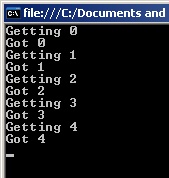
This generates the following output:


It just makes sense to do it this way, much cleaner and much more efficient.

For more details check of MSDN on yeald.

It’s worth noting that Yield is not support with VB.NET


Configuration for NLog

When I am writing an application it is so important to make sure you record and log information correctly, there are a number of free loggers you can use

I have come to use NLog, by Jaroslaw Kowalski, it’s so easy to use and get up and running, which is what you really need if you are using a logger of any type.

But what is the best practice when using a log in a live environment?

Or more importantly what and how do you configure you configuration file to make sure you are logging all your information?

The way I see it is, capture your logging to the Event Log and a Database for information and tracing.

When it comes to Errors and Fatal logging then, write it to as many places as you can, an Error file, the Event Log, a Database Log, and perhaps a special Exception Database Log, because if something has failed, you’ll want to shout about it, and you want to record it in as many places as possible.

Here is an example of an NLog configuration

NLog.config (2.63 kb)

To setup the database use the following creation creation script

NLogDatabase.sql (1.16 kb)

Make sure within the SQL Database you have a user “nloguser”, with a password of “nlogpassword”, these are both defined in the NLog configuration file, and can be changed if need be.

That is it, all you have to do now is wait for your live application to log some information.

I am sure there are a few other configuration options available and I welcome anyones comments on how to improve this configuration file.

Finding if any records exist in a table

When you need to find if any records exist in a table or a selective snap shot of a table, you are prehaps like me in using the COUNT(*) SQL transaction and see if there are zero counts, but is this the most efficient method?

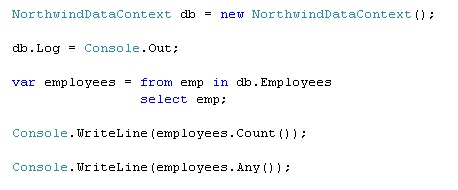
After a performance issue on one of my applications I found a new extension to LINQ to SQL called ANY(), from Ray Booysen on StackOverflow, here is an example of the SQL that is generated from LINQ:

The Results:

SELECT COUNT(*) AS [value] FROM [dbo].[Employees] AS [t0]

9

SELECT (CASE WHEN EXISTS(SELECT NULL AS [EMPTY] FROM [dbo].[Employees] AS [t0]) THEN 1 ELSE 0 END) AS [value]

True

As you can see LINQ wins the day again.

TFS, SoureSafe or Subversion

Quite often when I start at a new client they ask me what are the benefits of TFS (Team Foundation Server), as they can not justify the cost, as it is very confusing (like may of Microsoft pricing structures)

I found this about “How much does Team Foundation Server REALLY cost vs SourceSafe?” by Eric Nelson, which is just what I have been looking for, as you can see the cost is not that much more than SourceSafe, and you gain huge benefits from TFS, as it is not just a Source Control, it’s much much more.

Method for retrieving movie posters

A couple of weeks ago I released an online TV guide for Danish viewers called ifjernsyn.dk. The goal was to make a very simple overview that could easily be accessed from a mobile phone and customized by any visitor without any login. The purpose was to always know what’s on the air right now and what programs will shortly follow – and of course to keep it simple.

Since the release, some people have asked me about how I did some of the things and one of the most frequently asked questions was how to find movie posters for all the movies. Apparently, people are interested in finding movie posters for their own pet projects involving their own media collection or even a media center plug-in.

The code

With only the name of a movie, the code will search the Yahoo image search API and return a thumbnail of the poster. The API returns an XML document with both the thumbnail and the full image, so to get the full image you should just change the XPath navigation.

private const string LINK =“http://search.yahooapis.com/ImageSearchService/V1/imageSearch?appid=YahooDemo&query={0} movie&results=1”;


public static string FindMoviePoster(string title)

{

  string url = string.Format(LINK, HttpUtility.UrlEncode(title));


  XPathDocument xd = new XPathDocument(url);

  XPathNavigator navigator = xd.CreateNavigator();

  navigator.MoveToFollowing(XPathNodeType.Element);

  navigator.MoveToFirstChild();

  navigator.MoveToFirstChild();


  do

  {

    if (navigator.LocalName == “Thumbnail”)

    {

      navigator.MoveToFirstChild();

      return navigator.Value;

    }

  } while (navigator.MoveToNext());


  return null;

}

The implementation

To use the method above in your own web page, simply pass a movie title to the method and the image URL is returned. It could look like this:

string posterUrl = FindMoviePoster(“independance day”);;

if (!string.IsNullOrEmpty(posterUrl))

{

  imgPoster.ImageUrl = posterUrl;

}

The reason to use the Yahoo API is because it provides the thumbnails as well as the full image.

Backup Strategy

How may time does it take to lose import files or photos held on your computer before you put in place a backup strategy to protect your files.

I thought I’d share my personal backup strategy, as I don’t just reply on one process, in fact I have three sync/backup methods


Windows Live Mesh

This just has to be the best sync application around, so easy to configure, all you need is a Windows Live Signin and download a small local application and then just select which folders you want to sync.

Once you have sync’ed your folders they are available online or anyother machine you have installed Live Mesh application on to.

With a built in Remote Desktop application allow you to connect to your pc when you are away from home, this is a god send if you forgot something you left on you machine, or you just need to access one of your applications when you are away from your computer.

Currently Live Mesh is in Beta, I think this is due to the fact that it is running on Microsofts Cloud which is not full live yet.

The other draw back is it currenly only supports up to 5GB of storage, so you need to pick and choose what you want to sync, but for most users this is more than enough storage space.

Carbonite

This is an online backup storage application, unlike other backup applications it just works and does not get in the way of your working.  With unlimitted online storage it is perfect for high end users such as myself.  Only limitatation is a maximum file size of 2GB, which is not normal an issue.

External Hard Drive (Allway Sync)

With external hard drive so cheap this is a must have, and so easy to setup just purchase, it arrives in the post, plug it i, format and you are away.  The final step is to find an application that will sync to the external hard drive.  I choose Allway Sync, free download, a little techincal in setting up and getting going, would have been nice if this application had a noddy setup and looked at what and how your machine was configured and prompted you with a possible suggestion for sync.  But it’s free and it works.


So there you have it, three places where I keep all my files, and two places for my music, photos and videos

Other Alternatives

Online Storage Services Review 

The Online Storage Gang

this and that