After looking around and playing with WCF for a while, it had come to my notice that all the examples that I could find were over complex, then I came across Ralf’s Sudelbücher blog entry for “A truely simple example to get started with WCF“, so simple, so to help you along here is the C# source code that I have written, with a few additions in that the solution also has a client console that calls the WCF application to show a true sence of what is happening.
BBC Mobile greatly improved
The BBC have updated the mobile access for the website, it is a much improved access point, and works very well on my iPhone
Avatar – Which one are you?
I like this ad, it says so much about our world today
SQL 2008 Activity Monitor
Okay, where has the Activity Monitor gone in Microsoft SQL Server Management Studio 2008?
- Open Microsoft SQL Server Management Studio.
- In Object Explorer, right click on the server and select Activity Monitor. Please note that the Activity Monitor is not available in the context menu unless you select the server. You cannot launch the Activity Monitor when you select a database, another folder, etc.
Why did Microsoft move this, I don’t know
Visual Basic auto compiler
Working hard with VB.Net, hard work, as I find C# much cleaner, but VB.NET does have the advantage of be able to edit code while debugging. And it compiles while you are working, but I have found that with 64 projects in my solution that the automatic compiler sometimes, quite a lot of the times hogs the machines resources, it would be nice to be able to turn the auto compiler off.
Viewing the SQL that is generated from LINQ to SQL
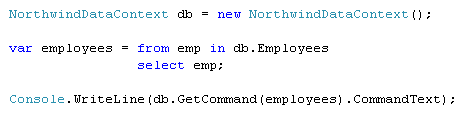
There comes a time when you are using LINQ to SQL that you just have to find out what SQL is being generated, for what ever reason that is, here a a few ways to get the SQL you are looking for:
You can use SQL Server Profile to see the traffic going to and from the database
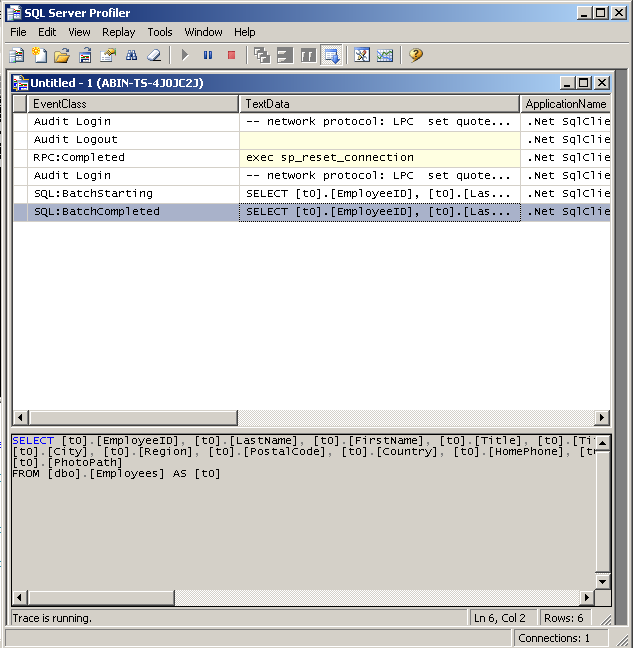
But if you are like me you want more control over your processes, so you can use the DataContext.Log, and output the log to a window, or in the case below the console window

One last method is to just write out an objects SQL, using the GetCommand, as seen below
Windows Service
I need to generate a Windows Service application, I’ve done this before, but could I remember how to do it. In my searching I found this code sample very useful Creating a Basic Windows Service in C# on The Code Project
Another useful article I found was from Microsoft Windows Services: New Base Classes in .NET Make Writing a Windows Service Easy
DDD South West Registration Is Open!
Go! Quickly! Stop reading this and register now! Registration for DDD South West is now open. Be able to tell your grandchildren that you were there at the very beginning. Remember, there can be only one first time.
DDD South West is a free one day technical event on Saturday 23rd May 2009 at Queens College, Taunton with 13 of the countries’ best speakers providing 19 technical presentations.
Bye Bye SQL Enterprise Manager
Just found a great LINQ tool for quering any database LINQPad, is so useful I almost fell off my chair when I found it.
If you’re using LINQ then this is a must on a list of tool you need to have.
When I was using it I thought it would be nice to have Autocompletion, and it does, so long as you register the product.
Testing your Website with different browsers
If you are like me, when you have generated your website you’ll need to make sure it works in all the Web Browsers.
My normal approach would be to fire up all my different Virtual Machines, each with a virgin copy of each web browser. This process works fine and it is a very good way of making sure all your site works in different browsers.
However I came across a site today, Browser Shots, with thanks to Guy, that will run your website in a host of different browsers, and return back a screen shot of what it looks like, this is the fastest way to see if your site works in a lot of Browsers. Just enter your website and let it do all the work for you.