Speed up the Copy process on Windows Vista
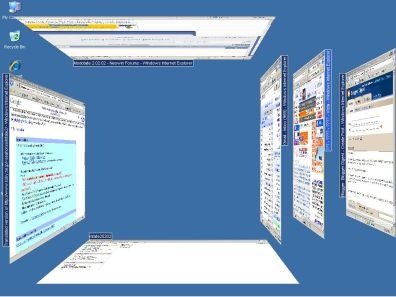
Cancel some of Windows Vista Effects

1. Open Control Panel.
2. Click on ‘System and Maintenance’.
3. Click “Performance Information and Tools”.
4. Click “Adjust Visual Effects”.
Remove Tablet Feature
.jpg)
How do you convert a string into an enum?
I've come across the situation on a number of occasions when coding where I've wanted to convert from a string to an enum.
Here is one of those methods that you can never find when you're looking for it, but once discovered it seems blindingly obvious:
object Enum.Parse(System.Type enumType, string value, bool ignoreCase);
So you can write the following kind of code:
enum Colour
{
Red,
Green,
Blue
}
// …
Colour c = (Colour) Enum.Parse(typeof(Colour), "Red", true);
Console.WriteLine("Colour Value: {0}", c.ToString());
// Picking an invalid colour throws an ArgumentException. To
// avoid this, call Enum.IsDefined() first, as follows:
string nonColour = "Polkadot";
if (Enum.IsDefined(typeof(Colour), nonColour))
c = (Colour) Enum.Parse(typeof(Colour), nonColour, true);
else
MessageBox.Show("Uh oh!");
Footnote: interestingly, whilst writing this up I noticed that Enum.IsDefined() doesn’t offer the ignoreCase parameter. If you don’t know whether the casing is right, it seems the only way to do the conversion is using the Parse method and catching the ArgumentException. That's not ideal, since it runs a lot slower. I wonder if this is a loophole in the design?
DateTime Format
I’m always searching the internet for DateTime formats, so I’ve placed them in my Blog so I’ll also know where I can find them
DateTime Format Specifiers
Below lists the valid format specifiers supported by the Format method on theDateTime type (see System.IFormattable).
DateTime Format Specifiers
| Specifier | String Result |
| d | MM/dd/yyyy |
| D | dddd, MMMM dd, yyyy |
| f | dddd, MMMM dd, yyyy HH:mm |
| F | dddd, MMMM dd, yyyy HH:mm:ss |
| g | MM/dd/yyyy HH:mm |
| G | MM/dd/yyyy HH:mm:ss |
| m, M | MMMM dd |
| r, R | Ddd, dd MMM yyyy HH’:’mm’:’ss ‘GMT’ |
| s | yyyy-MM-dd HH:mm:ss |
| S | yyyy-MM-dd HH:mm:ss GMT |
| t | HH:mm |
| T | HH:mm:ss |
| u | yyyy-MM-dd HH:mm:ss |
| U | dddd, MMMM dd, yyyy HH:mm:ss |
| y, Y | MMMM, yyyy |
Here’s an example that uses these custom format specifiers on a DateTime value:
using System;class TestDateTimeFormats {static void Main( ) {DateTime dt = new DateTime(2000, 10, 11, 15, 32, 14);// Prints "2000-10-11T15:32:14"Console.WriteLine(dt.ToString( ));// Prints "Wednesday, October 11, 2000"Console.WriteLine("{0}", dt);// Prints "10/11/2000"Console.WriteLine("{0:d}", dt);// Prints "Wednesday, October 11, 2000"Console.WriteLine("{0:D}", dt);// Prints "Wednesday, October 11, 2000 3:32 PM"Console.WriteLine("{0:f}", dt);// Prints "Wednesday, October 11, 2000 3:32:14 PM"Console.WriteLine("{0:F}", dt);// Prints "10/11/2000 3:32 PM"Console.WriteLine("{0:g}", dt);// Prints "10/11/2000 3:32:14 PM"Console.WriteLine("{0:G}", dt);// Prints "October 11"Console.WriteLine("{0:m}", dt);// Prints "October 11"Console.WriteLine("{0:M}", dt);// Prints "Wed, 11 Oct 2000 22:32:14 GMT"Console.WriteLine("{0:r}", dt);// Prints "Wed, 11 Oct 2000 22:32:14 GMT"Console.WriteLine("{0:R}", dt);// Prints "3:32 PM"Console.WriteLine("{0:t}", dt);// Prints "3:32:14 PM"Console.WriteLine("{0:T}", dt);// Prints "2000-10-11 22:32:14Z"Console.WriteLine("{0:u}", dt);// Prints "Wednesday, October 11, 2000 10:32:14 PM"Console.WriteLine("{0:U}", dt);// Prints "October, 2000"Console.WriteLine("{0:y}", dt);// Prints "October, 2000"Console.WriteLine("{0:Y}", dt);// Prints "Wednesday the 11 day of October in the year 2000"Console.WriteLine("{0:dddd 'the' d 'day of' MMMM 'in the year' yyyy}", dt);}}
Windows and .NET incompatability
There are some things to consider when using these default formatters in an international environment.
Console.WriteLine("{0:t}", dt); // Prints "3:32:14 PM"Console.WriteLine("{0:T}", dt); // Prints "2000-10-11 22:32:14Z"
The difference between {0:t} and {0:T} has to be taken into account. This difference is due to the fact that .NET has two date time representations—Long ( T ) and Short ( t )—while Windows uses only the Long notation.
So, if a user changes the Regional Settings in Windows only the Long notation will follow this change in .NET. This means that the programmer has to perform his own formatting—and not use the default formatters—if he wants to follow the users settings—not something a programmer should expect.
It’s worth check out SteveX Blog on String Formats
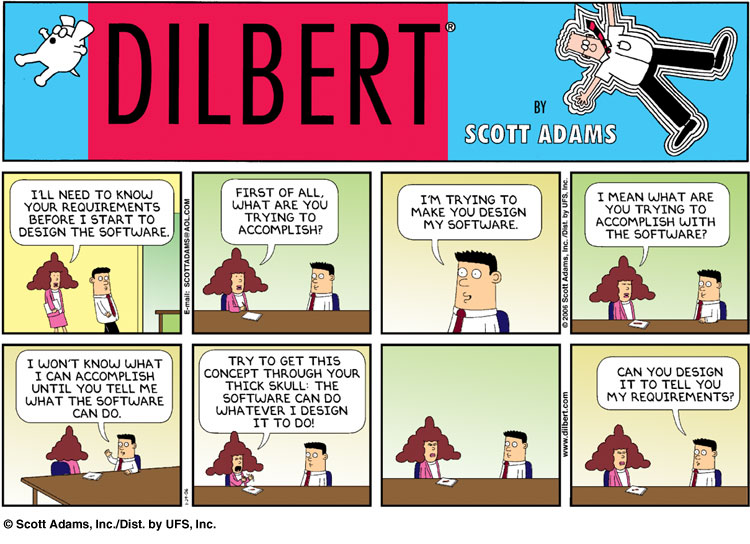
Software Requirements

The Swing
Just loved this cartoon, they always say a picture says a thousand words

Embed Picasa slideshows into BlogEngine.net
I was having a problem embedding a slide show from Picasa into my BlogEngine.net editor. Basically, the editor kept stripping the embed html. The trick is to edit \admin\tinyMCE.ascx file. You need to modify the extended_valid_elements entry. Apparently this is used to define valid html tags for the tinyMCE editor. Here are my additions in red:
extended_valid_elements : "hr[class|width|size|noshade],font[face|size|color|style],span[class|align|style],
script[charset|defer|language|src|type],code,iframe[src|width|height|frameborder|name|style],
embed[type|src|width|height|flashvars|pluginspage]",
Have fun!
Visual Studio, which version?
What version of Visual Studio is the most current?
Depending on what you are using and which application you are modifing the following are the latest releases of Visual Studio:
- Latest build is 9782 and this corresponds to Visual Studio 6.0 SP6.
- Version 7.1.6030. This corresponds to VS2003 SP1 and is a MANDATORY install. If you don't have it install it now.
- Version 8.0.50727,762 (SP). This corresponds to VS2005 SP1 and is a MANDATORY install. If you don't have it install it now. It can also take over an hour to install.
- Version 9.0.21022.8 RTM. This corresponds to the RTM release so if you have VS2008 you have this build.
Bottlenecks and Monitoring
I've come across this fab system monitoring tool, Spotlight for Windows
Spotlight on Windows empowers you to quickly identify and eliminate bottlenecks in the Windows environment
For a busy IT professional, it is nearly impossible to diagnose, troubleshoot, and resolve every component affecting Windows Operating System (OS) performance using manual methods. Without a clear view of I/O and system activity, you learn of performance issues only after problems erupt.
With its unique graphical view of the Windows OS internals, Spotlight on Windows will empower the user to rapidly eliminate and identify bottlenecks in the Windows environment. Displaying the real-time flow of data within your Windows OS, Spotlight enables you to quickly identify and resolve performance problems.
Limitations:
Spotlight on Windows is unsupported freeware. The license key is provided in the download package and expires one year after installation. To renew, please revisit this website. An activation key will be made available prior to the expiration date of your current key.
Examples of using System.Data.ParameterDirection with Sql Server
When working with the SqlCommand you will no doubt have to supply parameters to your command whether it be a Stored Procedure or Text command. Although not as efficient as an actual Stored Procedure there are some powerful things you can achieve using the System.Data.ParameterDirection, or rather other than just Input.
The enumeration holds the following values:
- Input
- InputOutput
- Output
- ReturnValue
In this article I will give a working example of each, simple but you will see the idea. At the end I will make a custom object which I will populate using some of these directions.
For this example I am working with the AdventureWorks Database for Sql Server 2005.
Input
The most common direction.
using (System.Data.SqlClient.SqlConnection sc1 =
new System.Data.SqlClient.SqlConnection(@"Data Source=REA_ANDREW-PC\SQLEXPRESS;Initial Catalog=AdventureWorks;"+
"Integrated Security=True"))
{
sc1.Open();
using (System.Data.SqlClient.SqlCommand command1 = new System.Data.SqlClient.SqlCommand())
{
command1.CommandType = CommandType.Text;
command1.Connection = sc1;
// DIRECTION :: Input
command1.CommandText = "INSERT INTO [Purchasing].[ShipMethod] (Name,ShipBase,ShipRate)"+
"VALUES (@Name,@ShipBase,@ShipRate)";
//Method 1
command1.Parameters.AddWithValue("@Name", "MyShippingMethod");
//Method 2
System.Data.SqlClient.SqlParameter parameter2 =
new System.Data.SqlClient.SqlParameter("@ShipBase", 10.00M);
parameter2.Direction = ParameterDirection.Input;
command1.Parameters.Add(parameter2);
//Method 3 //Deprecated for AddWithValue
command1.Parameters.Add("@ShipRate", 10.00M);
command1.ExecuteNonQuery();
}
}
Here I have displayed three different syntactical ways of adding parameters to your SqlCommand. The third and final way is deprectaed and you will see this if you try inside Visual Studio. Because of this it will not appear inside intellisense.
Output
The output is going to look like the above example only I will not give it an intial value and simply assign the value inside the command text.
using (System.Data.SqlClient.SqlConnection sc1 =
new System.Data.SqlClient.SqlConnection(@"Data Source=REA_ANDREW-PC\SQLEXPRESS;Initial Catalog=AdventureWorks;"+
"Integrated Security=True"))
{
sc1.Open();
using (System.Data.SqlClient.SqlCommand command1 = new System.Data.SqlClient.SqlCommand())
{
command1.CommandType = CommandType.Text;
command1.Connection = sc1;
// DIRECTION :: Input
command1.CommandText = "select @MyParameter = Count(*) FROM [Purchasing].[ShipMethod]";
System.Data.SqlClient.SqlParameter paramter1 = command1.Parameters.Add("@MyParameter", SqlDbType.SmallInt);
paramter1.Direction = ParameterDirection.Output;
command1.ExecuteNonQuery();
//The following value is now 6, the number of records inside the table
int newValue = (int)paramter1.Value;
}
}
Return Value
The return value is something which you will return at the end of the statement/s. For this example I need to create a short stored procedure, again i will simply return the count of records from the table:
ALTER PROCEDURE CountRows
ASDeclare @CountR intSELECT @CountR = Count(*) FROM [Purchasing].[ShipMethod]
RETURN @CountR
And so the function which will now work with this, and using the ReturnValue direction is as follows:
using (System.Data.SqlClient.SqlConnection sc1 =
new System.Data.SqlClient.SqlConnection(@"Data Source=REA_ANDREW-PC\SQLEXPRESS;Initial Catalog=AdventureWorks;"+
"Integrated Security=True"))
{
sc1.Open();
using (System.Data.SqlClient.SqlCommand command1 = new System.Data.SqlClient.SqlCommand())
{
command1.CommandType = CommandType.StoredProcedure;
command1.Connection = sc1;
// DIRECTION :: Input
command1.CommandText = "CountRows";
System.Data.SqlClient.SqlParameter paramter1 = command1.Parameters.Add("@CountR", SqlDbType.SmallInt);
paramter1.Direction = ParameterDirection.ReturnValue;
command1.ExecuteNonQuery();
//The following value is now 6, the number of records inside the table
int newValue = (int)paramter1.Value;
}
}
The simple example object
I now want to use these counting methods to construct a sample object which will contain simply.
- Total Record Count
- List<string> of Shipping Names which can be bound to
This is just for an example, I realise lol that I could simply use the List<string> Count property BUT think of it like this. What if you wanted to create a paged object so the list actual only contains say ten items because of a page size you set BUT you still have knowledge of the total number of records through the Total Record Count property, from which you could calculate the total number of pages.!! 🙂
The object
namespace WindowsForm_Examples_NET_2
{ class SimpleObjectOne
{
private int _recordCount;
private List<string> _shippingNames;
public List<string> ShippingNames
{
get { return _shippingNames; }
set { _shippingNames = value; }
}
public int RecordCount
{
get { return _recordCount; }
set { _recordCount = value; }
}
public SimpleObjectOne()
{
_shippingNames = new List<string>();
}
[System.ComponentModel.DataObjectMethod(
System.ComponentModel.DataObjectMethodType.Select)]
public static SimpleObjectOne GetSimpleObjectOne()
{
SimpleObjectOne objectOne = new SimpleObjectOne();
objectOne.Execute();
return objectOne;
}
private void Execute()
{
using (System.Data.SqlClient.SqlConnection sc1 =
new System.Data.SqlClient.SqlConnection(@"Data Source=REA_ANDREW-PC\SQLEXPRESS;Initial Catalog=AdventureWorks;" +
"Integrated Security=True"))
{
sc1.Open();
using (System.Data.SqlClient.SqlCommand command1 = new System.Data.SqlClient.SqlCommand())
{
command1.CommandType = System.Data.CommandType.Text;
command1.Connection = sc1;
// DIRECTION :: Input
command1.CommandText = "SET @CountRows = (SELECT Count(*) as COUNTR FROM [Purchasing].[ShipMethod]);" +
"SELECT Name FROM [Purchasing].[ShipMethod];";
System.Data.SqlClient.SqlParameter parameter1 =
command1.Parameters.Add("@CountRows", System.Data.SqlDbType.Int);
parameter1.Direction = System.Data.ParameterDirection.Output;
using (System.Data.SqlClient.SqlDataReader reader = command1.ExecuteReader())
{
while (reader.Read())
{
_shippingNames.Add(reader["Name"] as string);
}
}
RecordCount = (int)parameter1.Value;
//The following value is now 6, the number of records inside the table
}
}
}
}
}
An important note to make here, is if you are using the ExecuteReader on a statement and pass in Output parameters, you must close the data reader before you can access these output parameter values. In the above you will see that I encase the data reader in a using statement block.
And finally to consume this example I use the following three lines:
SimpleObjectOne newObject = SimpleObjectOne.GetSimpleObjectOne();
int RecordCount = newObject.RecordCount;
List<string> names = newObject.ShippingNames;
I now have 6 as the record count and a list of shipping names.