Category Archives: Uncategorized

Running NUnit from Visual Studio

If you are like me, I like to keep my Visual Studio environment as clean as possible, so if I can get away from adding any addins in to Visual Studio I will always go for that option.

So when it comes to testing I prefer to run with NUnit and run it as n external program.  

To do this just right click on the unit test project -> choosing the properties option -> setecting the Debug tab -> choose “start external program” and enter the NUnit assembly path, in my case this is “C:\Program Files\NUnit 2.5\bin\net-2.0\nunit.exe”, next is to select the command line arguments and point this to your unit test dll,

e.g.  “C:\Program Files\NUnit 2.5\samples\csharp\money\bin\Debug\cs-money.dll” /run

The “run” parameter will automatically run the loaded project

Alternatively you can use a Visual Studio add-in such as TestDriven.Net, this also provides NCoverExplorer to provide you with code coverage.

Building up an MVC application

When you open up MVC out of the box, you get the basic configuration, after a little playing around you soon see areas that require enhancing to, not only make your application more flexable, but also easier to maintain.

Here are a number of additional tasks you can perform that will help with your application.

Which IoC to use?

Don’t worry, if you use the Common Service Locator it provides an adstraction over the IoC

How to validate?

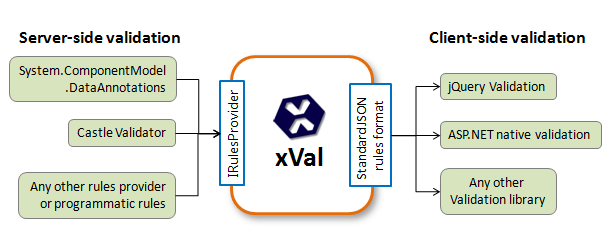
I have already covered this one in a previous post, but I’d still go with xVal

Need to generate Themes?

I think it is so important to start correctly and generating the User Interface should be configurable, the easiest way of doing this is to implement a Theme, and Chris Pietschmann has do this for us, Implement Theme Folders using a Custom ViewEngine

Here is a copy of the source for safe keeping.

ASPNETMVC_Preview5_CustomThemeImplementation.zip (226.05 kb)

Need Ajax to work in MVC

Ajax.BeginForm and PartialViews

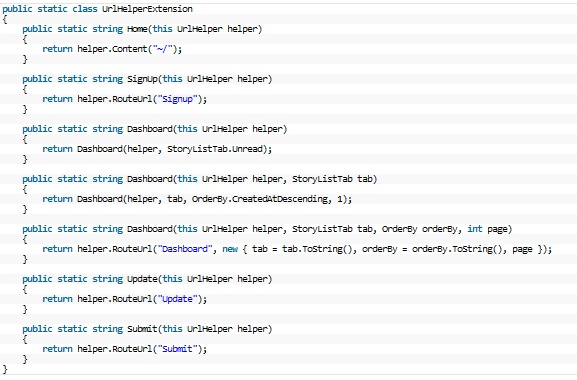
Extend the UrlHelper


Placing all your assets in one place is not only a good idea, but it also means you can be more flexable if you want to programmically change the theme of your user interface.


Which can be used like this:

Using Strongtypes and keep away from Strings

It appears so easy with MVC to use String everywhere, just DON’T, generate an extension for the UrlHelper

Now in your view it will look like this

Testing

I’ve been hit before by Microsofts in build Testing within Visual Studio 2008, great to have this feature built in, BUT, and a big but in order to run the tests you need to have Visual Studio install, so if you try and setup a Continuous Integration server you will also be required to install Visual Studio.

So best to go with what works well and that is nUnit, simple and easy, and more importantly loosely coupled

Mocking

With testing comes Mocking, and which framework do you use?  I also always say keep it simple and easy, so I’m going with Moq, short for “Mock-You”, as this is the only Mock Framework that is built around .Net 3.5 and LINQ.


MVC Validation

Validation is such an important part of development, and the best way I have found for the MVC is by Steven Sanderson, xVal, which is a validation framework for ASP MVC, even Scott Gu thinks it is absolutely fantastic.

If you are after using xVal with Linq to SQL then it is well worth checking out Integrating xVal Validation with Linq-to-Sql by Adam Schroder

It’s worth checking out Client-side form validation made easy by Adrian Grigore to extend this validation even further.

Don’t take my word for is, check out, ASP.NET MVC Validation Refresh: Best Techniques & Frameworks by Graham O’Neale

Speed and Performance of LINQ

I was wondering today if anyone had produced any benchmarks on the speed and performance of LINQ, so I had a look around and found that LINQ 2 SQL is 4 times faster than the Entity Framework.  Why is this?  It is due the the fact that the Entity Framework is a more generic solution, where as LINQ to SQL can be more fine tuned to the underlying database structure.

Here are a few links I found that might explain things in more details

ADO.NET Entity Framework Performance Comparison

How Slow is ‘Slow’?

Mocking


In object-oriented programming, mock objectsare simulated objects that mimic the behavior of real objects in controlled ways. A computer programmer typically creates a mock object to test the behavior of some other object, in much the same way that a car designer uses a crash test dummy to simulate the dynamic behavior of a human in vehicle impacts.

It is possible to perform integration testing on the Membership Provider, take a look at this blog entry to find out more Integration testing the MembershipProvider

Within the Project we are using Rhino Mocks, Oren Eini is doing a great job with this framework, and I think it’s the only one that seems to be keeping up with the latest features in .NET, other than TypeMock. Plus, it’s totally free to use. It’s also the only one other than TypeMock which does not require you to input strings for method names you’d like to mock, which is cool. It’s compelling to use it but the project is currently maintained by just one person. If Oren decides to drop it, or for any reason stop working on it, the book might turn out outdated quite quickly. Plus, it’s not very widely used, though it seems to be gaining in popularity.

References

Introduction to Mocking with Rhino Mocks

Mocking

Code Samples


RPS – Calculation Model

Calculation Model

There are a number of calculations and data transformations that need to take place in order to produce the correct Leakage Calculation.

In order to complete the Leakage Calculation as fast as possible we are going to separate the calculations and data transformations in to different processes and control these processes using a Windows Service.

In order for a Windows Service to handle separate processes we will be using the Multi Threading abilities of the .NET Framework.

[edit]Windows Service Installation

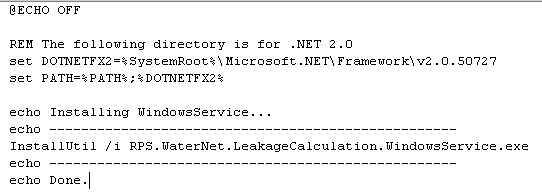
To install a Windows Service, you could create an installation program that encapsulates the executable for deployment, which I find time consuming and inefficient when testing an application. Or, you could install the service though the InstallUtil.exe process that comes with the .NET Framework.

I created a simple batch file, install.bat, to simplify installation (and therefore testing) of the service. The batch script is shown below; uninstallation is as simple as creating another batch file, uninstall.bat, with exactly the same script, only substituting the /i (for install) with /u (for uninstall).
[edit]WCF (Windows Communication Foundation

[edit]Introduction

We needed to be able to communicate with the Window Service running on the server, from anywhere on the network and the Internet if needed. So the best possible solution was to use [Microsofts WCF], as it is very flexible and configurable.

[edit]Service Contract

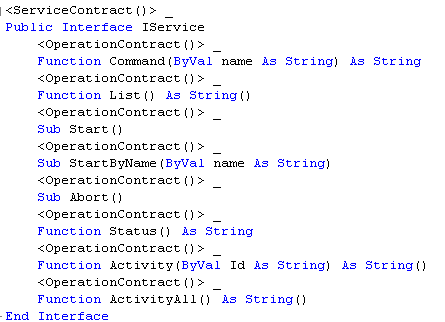
We need to implement a service contract, this provides an interface that we can use to be able to communication with the service.
[edit]Command

Provides a method to invoke a command to the service, mainly used for testing and debugging

[edit]List

Get a list of Calculation that are available to be processed

[edit]Start

Start all the calculations

[edit]StartByName

Start a single calculation process by its name

[edit]Abort

Stop all calculations and abort their threads

[edit]Abort

Stop all calculations and abort their threads

[edit]Status

Return if any calculations are still running

[edit]Activity

Display the activity of all the processes that have ever happened since the service started

This returns back a String Array, and in each string a comma delimited structure.

Name, Id, Date/Time, Status

[edit]ActivityById

Returns the activity for a given Id

This returns back a String Array, and in each string a comma delimited structure.

Name, Id, Date/Time, Status

[edit]ActivityCancel

Clears all the Activity information

[edit]Multi Threading

[edit]Starting

Before we start the thread we need to ensure that when the Windows Service is closed, that all the threads are stopped. To do this you must set the thread to a background process withIsBackground

When a thread terminates because of its parent process, it stops dead, and no finally blocks are executed.

The same situation arises when a user terminates an unresponsive application via the Windows Task Manager, or a process is killed programmatically via Process.Kill.

Therefore Restarting the Windows Service will cause the threads to stop in their tracks, which is perhaps what you are after if you restart or stop a service.

[edit]Abort

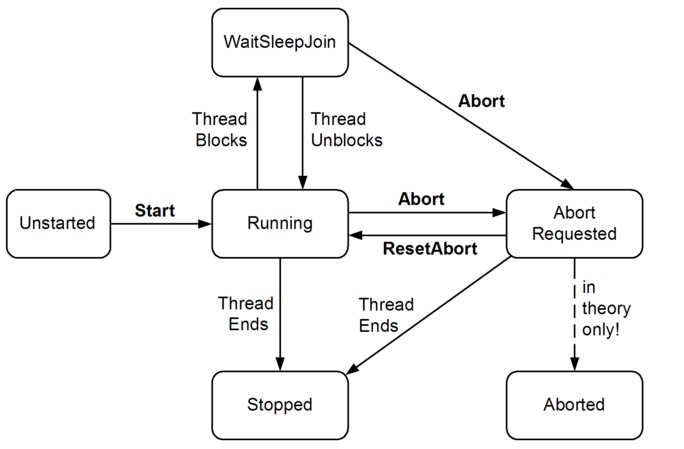
Abort will work on a thread in almost any state – running, blocked, suspended, or stopped. However if a suspended thread is aborted, a ThreadStateException is thrown – this time on the calling thread – and the abortion doesn’t kick off until the thread is subsequently resumed.
[edit]Configuration

[edit]App.Config

The application configuration file can be configured to handle the different calculations, we are using the standard .NET configuration settings, using a Section Group, within the Config Sections tag, of WaterNet, and implementing the leakage section handler, as seen below:

To configure the separate calculations you add each calculation in to the leakage tag, as seen below:
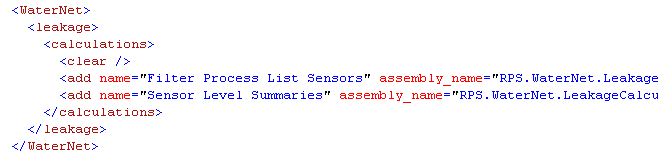
Here is a list of possible configuration options available for the calculation plugins

[edit]name

The name of the Calculation Required

[edit]assembly_name

The assembly name to be used, comprising of the method and the Assembly name, both including the full namespace. Required

[edit]numberOfThreads

sets the maximum number of threads available for this process to run at any one time default = 1

[edit]isBackground

Indicating whether or not a thread is a background thread. default = True

[edit]priority

Indicating the scheduling priority of a thread.

default = Normal

A thread can be assigned any one of the following priority values:

Highest

AboveNormal

Normal

BelowNormal

Lowest