How do you retrieving the XmlEnumAttribute values for an Enum

When you are playing with Web Services you quite often find information held in an Attribute, but how do you get it out?

e.g.

public enum Classification {

        [System.Xml.Serialization.XmlEnumAttribute(“Test drive demonstrator”)]
        Testdrivedemonstrator,

        [System.Xml.Serialization.XmlEnumAttribute(“Showroom vehicle”)]
        Showroomvehicle,


By using reflection you can gain access to the attribute, here is how:

Type enumType = typeof(velocityUom);

foreach (FieldInfo fi in enumType.GetFields())

{

object[] attrs = fi.GetCustomAttributes(typeof(XmlEnumAttribute), false);

if (attrs.Length > 0)

{

Console.WriteLine(((XmlEnumAttribute)attrs[0]).Name);

}

}


Last Years Toys

It’s a new year and it’s must be time for me to go over what toys I have played with in 2009.

  • Balsamiq Mockups must be the best application and tool that I have come across this year, after giving a talk to DotNetDevNet on the application I found that many other developers went ahead and bought the application too.
  • NotePad+, which is an extended version of the very basic default NotePad that comes with Windows.  Just replace your NotePad with this one and off you go.
  • SysInternals Process Explorer I have used every day, mainly due to the fact that Windows does not handle resources and memory that well, so you have to have a tool to sort it out for you when things go wrong.
  • GhostDoc is an internal tool for use with Visual Studio and cuts down the amount of time required for documentation, and does it right all the time.
  • The biggest and most impressive toy last year has to be the purchase of a MacBook, it’s so much easier than Windows 7, XP or Vista, and things just work as they should do, well designed and well throughout, this gets 10 out of 10 for last years toys.
I’m sure I’ve used some other toys last year, but these are the ones that I remember the most.

There is already an open DataReader associated with this Command which must be closed first.

Having been using LINQ to SQL for some time now, I came across my very first issue “There is already an open DataReader associated with this Command which must be closed first.” it’s been some time since I had this issue.

The issue only appears on one database and that is being held on a SQL 2000 box.

The solution, sorry work around, is to transfer the results in to Lists using ToList() after each LINQ call.

I have found it hard to replicate in my test environment, as it only happens on a clients installation.

David Foderick posted a similar issue he had with the Entity Framework

After speaking with Eric Nelson, he pointed out that SQL 2000 has a lack of support for MARS, however there is no planning to provide support for this, however SQL Azure does not allow MARS. So perhaps this issue will get addressed some time in the future?

JQuery and the DropDownList – ComboBox

After playing around with Combo boxes for a while within jQuery I thought it would be good to write down, mainly so I can remember how to find and play with properties from within jQuery.  So here we go, here is the HTML that we’ll be using:

 <select id=”ComboBox” >
   <option value=”1″>Value 1</option>
   <option value=”2″>Value 2</option>
   <option value=”3″>Value 3</option>
   <option value=”4″>Value 4</option>
   <optgroup label=”Group1″>
      <option value=”5″>Value 5</option>
      <option value=”6″>Value 6</option>
      <option value=”7″>Value 7</option>
      <option value=”8″>Value 8</option>
   </optgroup>
</select>

Get the value of the selected item

This is the easiest.  Use the val method.

$(“#ComboBox”).val()

Get the text of the selected item

If you just try using the text() method on the combobox, this will give you the text values of all of the options in a single string.  Not what you want.  The trick is to use the :selected query modifier on the option.

$(“#ComboBox option:selected”).text()

Find out when the select value changed

This is also rather easy with JQuery.

$(“#ComboBox”).change(function() { /* do something here */ });

Programmatically set the selected item.

$(“#ComboBox”).val(2);

Modify the list.

Modifying a select element is not fundamentally different than modifying any other element in the dom, but there are a few basics here to keep in mind. Mainly: try to avoid using the dom directly.  Create html strings instead.

Clear the list:   $(“#ComboBox”).html(“”);

Add to the list: $(“<option value=’9’>Value 9</option>”).appendTo(“#ComboBox”);

For more information check out the jQuery API

The start of a partnership

It’s time for me to upgrade my development computer, in order to do this I have a few requests of my new partnership, mainly due to the fact that Windows 7 has been out for a while, well from MSDN, and it has made a huge step forwards being able to harness the power of the processor.

First it’s got to be a processor worth having and I’m currently looking at the Intel Nehalem i7 920 S1366 2.66GHz (£213 from Dabs, or Amazon) or  AMD Phenom II X3 720, which kicks arse on most processors that are out at the moment. This chip can be bought from Amazon at around £97.

Next is the motherboard, which must support the ability for a lot of memory and support the AMD processor above, the Gigabyte MA790xt-ud4p, appears to do the job, and at £95 from Ebuyer.com.  Or going for the Intel processor there is the Gigabyte S1366 Intel X58 DDR3 ATX Audio 2GbE Lan 3 Channel (£194 from Dabs)

As a developer you need to have a number of monitors, you need to see as much as you can to work efficiently, a graphics card that is capable of driving three if not more monitors is a must.  The ATI-based graphics ATI Radeon™ HD 5870 graphics Graphics Card, is a mega graphics card and should support up to 3 monitors.  This can be bought from Dabs costing around £299, what about this link too, it’s just starts to get confusing!

Next and very importantly the machine must be 64bit and support Virtualization Technology, in order to use Microsoft Virtual PC in Windows 7 this has become a slight issue as not all processors support Virtualization. I came across a post by Marcus Yam, Which Intel CPUs Support XP Mode Virtualization?, which provides a good list of chips, also Intel provide a list of features for their chip sets, which is most helpful.  Ed Bott has a good post too on How many Intel CPUs will fail the XP Mode test in Windows 7?.  Apparently AMD has virtualization built into all 65nm and 45nm processors, so that makes it a little easier.

What about the motherboards will they support Virtalization Technology?  I’ve not managed to find this out yet.

The main hard drive is going to have the be a solid state hard drive, as I do like the idea of loading applications up in seconds, something like Crucial 64GB 2.5″ M225 SATAII Solid State Drive?, which comes in at £165, from Dabs, not bad for such blistering performance, the question is whether I RAID the drive or not?  Not sure what the benefits would be to me, performance is not an issue with a solid state hard drive, and for reliability I am using Windows Home Server which backs up every night.  Or am I missing something with RAID?

The file system to storing all my data is not really an issue as Terabyte hard drives are two a penny these days.

Next is the memory I need to have about 8 Gbytes in order to perform fast Virtualization with the ability to expand further if I need to, I know the memory needs to be fast and what I’m not sure about yet is what type and speed do I need the memory to be?  I’ve heard about Triple Channel and Dominator, but what is this all about?  I’ve come across the Corsair (TR3X6G1866C9DF) 6GB DDR3 3X2GB DDR3-1866 CL 9-9-9-24 Triple Channel Memory Kit as £227 from Amazon a little high priced how ever very fast or another option is Corsair Memory DDR3 1333MHz 12GB Core I7 Supt, which appear to be good value at only £225 from Dabs.

With all the hardware I’m going to have to get a Power Supply Unit to drive it all, Corsair Memory 1000W ATX PSU (£160), and to house the kit it’s going to have to be a large desktop case (£85)

Other accessories I will need also to make my machine, some Arctic Silver 5 3.5g Thermal Paste, Arctic Silver ArctiClean Thermal Material Remover & Surface Purifier 60ml Kit, and Nylon 6.6 Plain Washers, Colour : Natural, Thread Size : M5

Next question is will all of the above work together?

My research has taken me many places and it all started at DotNetDevNet, with Jose and Guy helping me out.

So my search goes on.
Team Foundation Server 2008 installing on a single server

I was given the task of installing Team Foundation Server on a single server, and there are a few things to check and need to have installed before you can install


First read and the supplied TFSInstall.chm install guide file. This is key – if you are new to the TFS install and do not follow the supplied “checklists” for your chosen set up, you will endure pain and agony. 

I pretty much tried to follow the install guide by the book, but below points out some specifics of our set up and the issues I came across.


  1. I install Windows Server 2003 on a Virtual Machine
  2. Install IIS
  3. Install SQL Server 2005 Standard Edition
  4. Install SQL Server 2005 Service Pack 2
  5. Apply all the updates to Windows
  6. Downloaded en_visual_studio_team_system_2008_team_foundation_server_workgroup_x86_x64wow_dvd_X14-29253.iso from MSDN subscription and extracted the files.


How do I create the aspnetdb database?

I’ve been using the Microsoft Aspnetdb database for some time now, and I still get asked about how to create the database, so here you go enjoy:

Microsoft has a new and powerful default database schema in ASP.Net 2.0 as ASPNETDB.mdf database. This database file serves as a role provider, and membership provider. Visual Web Developer 2005 supports the ASP.Net configuration to manage this personal aspnetdb database file within the web application inside the App_Data folder. Aspnetdb database helps in managing users along with their roles e.g. admin, employee, editors etc. It also enables the in-built functionality of Login controls and web parts to be integrated on ASP.Net 2.0 web pages that helps in managing user profiles, login, and personalized user pages very easily even without writing the bulky code to implement the sql queries or stored procedures along with data access code for inserting, updating or deleting the user personalized data.

How to create Aspnetdb database?

Using aspnet_regsql command:

You can use aspnet_regsql command to create aspnetdb database. This command executes the default scripts to create the default database for asp.net 2.0 web applications.

Steps to create aspnetdb database using aspnet_regsql command:

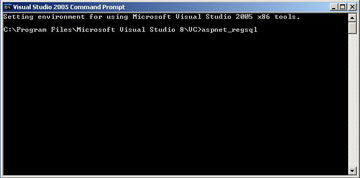
  1. Open the Visual Studio 2005 command prompt from Start –> All Programs –> Microsoft Visual Studio 2005 –> Visual Studio Tools –> Visual Studio 2005 Command Prompt
  2. Type aspnet_regsql and press enter key 
  3. This will open the ASP.Net SQL Server Setup wizard. Click next to continue… 
  4. In the next screen select the option to Configure SQL Server for application services. This option executes a script to configure the database for managing user profiles, roles, membership and personalization. Click next to continue…
  5. In this step enter the sql server name and choose the right authentication method. Leave the database field to default and click next… 
  6. Confirm your settings and click next to finish. 

It’s also worth checking out:

How to Collaborate with Remote Employees

I’ve been working at home on and off for a number of year, and one thing that always comes up is how to collaborate with remote employees over the internet.

I have been using Microsoft Shared View, it’s easy to use and just does the job.  If you are using a Mac then you could also try out Microsoft Shared View for the Mac, although I have not tested this out yet.

It’s also worth check out How to Collaborate with Remote Employees with Office Communicator 2007 R2 by Scott Hanselman, for other ways for collaborate.

ASP.Net MVC Custom Error Pages

Now that I’m using MVC fully it’s time to implement a Customer Error Page.

As ASP.NET MVC is a layer on top of ASP.NET we can still use the same Customer Errors that we are used to in the Web.Config, so just to make it SEO friendly, here is what it can look like:

<customErrors mode=“On“ defaultRedirect=“~/Error/Unknown“ />


http://www.genericerror.com/blog/2009/01/27/ASPNetMVCCustomErrorPages/


Other references worth check out are:

ASP.NET Custom Errors: Preventing 302 Redirects To Custom Error Pages

Better Custom Errors in ASP.NET

404 vs 302 ASP.Net Custom Errors

this and that