MVC 2 Preview 1
The first of the next version of MVC 2 has been release by Microsoft, a few nice features, which has extended the Html helpers.
The full release will be shipped with Visual Studio 2010, and a version will be available for download for Visual Studio 2008 sp1 at the same time.
Why not watch it on Channel 9 – ASP.NET MVC 2 Preview 1 with Phil Haack and Virtual Scott
For more details check out Haacked
ASP.NET MVC Futures
Where are those extra features that did not quite make it in the initial release of ASP.MVC 1.0, they can be found on Code Plex, ASPNET
ASP.NET MVC Futures – Microsoft.Web.Mvc
The following are a few items in the ASP.NET MVC Futures assembly:
- AsyncController
- ButtonBuilder
- Html.Substitute CacheExtension
- FileCollectionModelBinder
- LinqBinaryModelBinder
- Html.Mailto Helpers
- SkipBindingAttribute
- RequireSslAttribute
- AcceptAjaxAttribute
- Html.RenderAction and Html.RenderRoute Extensions
- Repeater Control
- ByteArrayModelBinder
and more, for more details check out Maarten Balliauw Blog
DDD South West Video
After a great DDD South West, now comes the video, great production, setting a high standard for years to come
Deploying MVC on IIS 6
If and when you have to deploy your MVC application, you’ll soon find out that IIS6 does not support Url Rewriting. There are a number of options available to you, for a good list check out Steve Sanderson’s Deploying ASP.NET MVC to IIS 6, the one I’m currently using is:
Use a wildcard mapping for aspnet_isapi.dll
This tells IIS 6 to process all requests using ASP.NET, so routing is always invoked, and there’s no problem. It’s dead easy to set up: open IIS manager, right-click your app, go to Properties, then Home Directory tab, then click Configuration. Under Wildcard application maps, click Insert (not Add, which is confusingly just above), then enter C:\WINDOWS\Microsoft.NET\Framework\v2.0.50727\aspnet_isapi.dll for “Executable”, and uncheck Verify that file exists.
Done! Routing now just behaves as it always did in VS2008’s built-in server.
Unfortunately, this also tells IIS to use ASP.NET to serve all requests, including for static files. It will work, because ASP.NET has a built-in DefaultHttpHandler that does it, but depending on what you do during the request, it might use StaticFileHandler to serve the request. StaticFileHandler is much less efficient than IIS natively. You see, it always reads the files from disk for every request, not caching them in memory. It doesn’t send Cache-Control headers that you might have configured in IIS, so browsers won’t cache it properly. It doesn’t do HTTP compression. However, if you can avoid interfering with the request, DefaultHttpHandler will pass control back to IIS for native processing, which is much better.
For small intranet applications, wildcard mappings are probably the best choice. Yes, it impacts performance slightly, but that might not be a problem for you. Perhaps you have better things to worry about.
For larger public internet applications, you may need a solution that delivers better performance.
Snippet taken from Steve Sanderson’s Deploying ASP.NET MVC to IIS 6
For more information take a look at ScottGu’s blog, Tip/Trick: Url Rewriting with ASP.NET
Also worth taking a look at Phil Haacked articles on ASP.NET MVC on IIS 6 Walkthrough
Culture Codes
A comprehensive list of culture codes used for localising and in conjunction with the CultureInfo class.
The CultureInfo class specifies a unique name for each culture, based on RFC 4646 (Windows Vista and later). The name is a combination of an ISO 639 two-letter lowercase culture code associated with a language and an ISO 3166 two-letter uppercase subculture code associated with a country or region.
| Code | Language – Country/Region | Code | Language – Country/Region |
|---|---|---|---|
| af | Afrikaans | hu-HU | Hungarian – Hungary |
| af-ZA | Afrikaans – South Africa | is | Icelandic |
| sq | Albanian
|
is-IS | Icelandic – Iceland |
| sq-AL | Albanian – Albania | id
|
Indonesian |
| ar | Arabic | id-ID | Indonesian – Indonesia
|
| ar-DZ | Arabic – Algeria | it | Italian |
| ar-BH | Arabic – Bahrain | it-IT | Italian – Italy |
| ar-EG | Arabic – Egypt | it-CH | Italian – Switzerland |
| ar-IQ | Arabic – Iraq | ja | Japanese |
| ar-JO | Arabic – Jordan | ja-JP | Japanese – Japan |
| ar-KW | Arabic – Kuwait | kn | Kannada |
| ar-LB | Arabic – Lebanon | kn-IN | Kannada – India |
| ar-LY
|
Arabic – Libya | kk | Kazakh |
| ar-MA | Arabic – Morocco
|
kk-KZ | Kazakh – Kazakhstan |
| ar-OM | Arabic – Oman | kok
|
Konkani |
| ar-QA | Arabic – Qatar | kok-IN | Konkani – India
|
| ar-SA | Arabic – Saudi Arabia | ko | Korean |
| ar-SY | Arabic – Syria | ko-KR | Korean – Korea |
| ar-TN | Arabic – Tunisia | ky | Kyrgyz |
| ar-AE | Arabic – United Arab Emirates | ky-KG | Kyrgyz – Kyrgyzstan |
| ar-YE | Arabic – Yemen | lv | Latvian |
| hy | Armenian | lv-LV | Latvian – Latvia |
| hy-AM | Armenian – Armenia | lt | Lithuanian |
| az
|
Azeri | lt-LT | Lithuanian – Lithuania |
| az-AZ-Cyrl | Azeri (Cyrillic) – Azerbaijan
|
mk | Macedonian |
| az-AZ-Latn | Azeri (Latin) – Azerbaijan | mk-MK
|
Macedonian – Former Yugoslav Republic of Macedonia |
| eu | Basque | ms | Malay
|
| eu-ES | Basque – Basque | ms-BN | Malay – Brunei |
| be | Belarusian | ms-MY | Malay – Malaysia |
| be-BY | Belarusian – Belarus | mr | Marathi |
| bg | Bulgarian | mr-IN | Marathi – India |
| bg-BG | Bulgarian – Bulgaria | mn | Mongolian |
| ca | Catalan | mn-MN | Mongolian – Mongolia |
| ca-ES | Catalan – Catalan | no | Norwegian |
| zh-HK
|
Chinese – Hong Kong SAR | nb-NO | Norwegian (Bokm?l) – Norway |
| zh-MO | Chinese – Macao SAR
|
nn-NO | Norwegian (Nynorsk) – Norway |
| zh-CN | Chinese – China | pl
|
Polish |
| zh-CHS | Chinese (Simplified) | pl-PL | Polish – Poland
|
| zh-SG | Chinese – Singapore | pt | Portuguese |
| zh-TW | Chinese – Taiwan | pt-BR | Portuguese – Brazil |
| zh-CHT | Chinese (Traditional) | pt-PT | Portuguese – Portugal |
| hr | Croatian
|
pa | Punjabi |
| hr-HR | Croatian – Croatia | pa-IN | Punjabi – India |
| cs | Czech | ro | Romanian |
| cs-CZ | Czech – Czech Republic | ro-RO | Romanian – Romania |
| da
|
Danish | ru | Russian |
| da-DK | Danish – Denmark
|
ru-RU | Russian – Russia |
| div | Dhivehi | sa
|
Sanskrit |
| div-MV | Dhivehi – Maldives | sa-IN | Sanskrit – India
|
| nl | Dutch | sr-SP-Cyrl | Serbian (Cyrillic) – Serbia |
| nl-BE | Dutch – Belgium | sr-SP-Latn | Serbian (Latin) – Serbia |
| nl-NL | Dutch – The Netherlands | sk | Slovak |
| en | English | sk-SK | Slovak – Slovakia |
| en-AU | English – Australia | sl | Slovenian |
| en-BZ | English – Belize | sl-SI | Slovenian – Slovenia |
| en-CA | English – Canada | es | Spanish |
| en-CB
|
English – Caribbean | es-AR | Spanish – Argentina |
| en-IE | English – Ireland
|
es-BO | Spanish – Bolivia |
| en-JM | English – Jamaica | es-CL
|
Spanish – Chile |
| en-NZ | English – New Zealand | es-CO | Spanish – Colombia
|
| en-PH | English – Philippines | es-CR | Spanish – Costa Rica |
| en-ZA | English – South Africa | es-DO | Spanish – Dominican Republic |
| en-TT | English – Trinidad and Tobago | es-EC | Spanish – Ecuador |
| en-GB | English – United Kingdom | es-SV | Spanish – El Salvador |
| en-US | English – United States | es-GT | Spanish – Guatemala |
| en-ZW | English – Zimbabwe | es-HN | Spanish – Honduras |
| et | Estonian | es-MX | Spanish – Mexico |
| et-EE
|
Estonian – Estonia | es-NI | Spanish – Nicaragua |
| fo | Faroese
|
es-PA | Spanish – Panama |
| fo-FO | Faroese – Faroe Islands | es-PY
|
Spanish – Paraguay |
| fa | Farsi | es-PE | Spanish – Peru
|
| fa-IR | Farsi – Iran | es-PR | Spanish – Puerto Rico |
| fi | Finnish | es-ES | Spanish – Spain |
| fi-FI | Finnish – Finland | es-UY | Spanish – Uruguay |
| fr | French | es-VE | Spanish – Venezuela |
| fr-BE | French – Belgium | sw | Swahili |
| fr-CA | French – Canada | sw-KE | Swahili – Kenya |
| fr-FR | French – France | sv | Swedish |
| fr-LU
|
French – Luxembourg | sv-FI | Swedish – Finland |
| fr-MC | French – Monaco
|
sv-SE | Swedish – Sweden |
| fr-CH | French – Switzerland | syr
|
Syriac |
| gl | Galician | syr-SY | Syriac – Syria
|
| gl-ES | Galician – Galician | ta | Tamil |
| ka | Georgian | ta-IN | Tamil – India |
| ka-GE | Georgian – Georgia | tt | Tatar |
| de | German | tt-RU | Tatar – Russia |
| de-AT | German – Austria | te | Telugu |
| de-DE | German – Germany | te-IN | Telugu – India |
| de-LI | German – Liechtenstein | th | Thai |
| de-LU
|
German – Luxembourg | th-TH | Thai – Thailand |
| de-CH | German – Switzerland
|
tr | Turkish |
| el | Greek | tr-TR
|
Turkish – Turkey |
| el-GR | Greek – Greece | uk | Ukrainian
|
| gu | Gujarati | uk-UA | Ukrainian – Ukraine |
| gu-IN | Gujarati – India | ur | Urdu |
| he | Hebrew | ur-PK | Urdu – Pakistan |
| he-IL | Hebrew – Israel | uz | Uzbek |
| hi | Hindi | uz-UZ-Cyrl | Uzbek (Cyrillic) – Uzbekistan |
| hi-IN | Hindi – India | uz-UZ-Latn | Uzbek (Latin) – Uzbekistan |
| hu | Hungarian | vi | Vietnamese |
Asp.net MVC, Html.DropDownList and Selected Value
I recently ran into the altogether common problem of the Html.DropDownList helper rendering a drop down list with no value selected. This is a major problem when editing data as by default, the first value is selected and saving would mean the first value is used.
There have been a few issues resulting in the same error. My issue was that I was setting the Name of the drop down list to be equal to the property on my model. I was using the Entity Framework, and had an Image class with a navigation property called Category. I was using this to render the ddl:
<%= Html.DropDownList(“Category”, (IEnumerable<SelectListItem>)ViewData[“categories”])%>
In my controller, I was setting the ViewData like this:
this.ViewData[“categories”] = new SelectList(db.CategorySet.ToList(), “CategoryId”, “Title”, img.CategoryReference.EntityKey);
Unfortunately, even though I had set the selected value (third parameter to the SelectList constructor), the ddl had no value selected.
The fix was quite simple:
<%= Html.DropDownList(“CategoryId”, (IEnumerable<SelectListItem>)ViewData[“categories”])%>
I just changed the Name of the drop down and handled the assignment in the controller.
The reason behind this problem is that asp.net MVC first looks for a match between the name of the drop down and a property on the model. If there’s a match, the selected value of the SelectList is overridden. Changing the name of the drop down is all it takes to remedy the issue.
Running NUnit from Visual Studio
If you are like me, I like to keep my Visual Studio environment as clean as possible, so if I can get away from adding any addins in to Visual Studio I will always go for that option.

So when it comes to testing I prefer to run with NUnit and run it as n external program.
To do this just right click on the unit test project -> choosing the properties option -> setecting the Debug tab -> choose “start external program” and enter the NUnit assembly path, in my case this is “C:\Program Files\NUnit 2.5\bin\net-2.0\nunit.exe”, next is to select the command line arguments and point this to your unit test dll,
e.g. “C:\Program Files\NUnit 2.5\samples\csharp\money\bin\Debug\cs-money.dll” /run
The “run” parameter will automatically run the loaded project
Alternatively you can use a Visual Studio add-in such as TestDriven.Net, this also provides NCoverExplorer to provide you with code coverage.
Building up an MVC application
When you open up MVC out of the box, you get the basic configuration, after a little playing around you soon see areas that require enhancing to, not only make your application more flexable, but also easier to maintain.
Here are a number of additional tasks you can perform that will help with your application.
Which IoC to use?
Don’t worry, if you use the Common Service Locator it provides an adstraction over the IoC
How to validate?
I have already covered this one in a previous post, but I’d still go with xVal
Need to generate Themes?
I think it is so important to start correctly and generating the User Interface should be configurable, the easiest way of doing this is to implement a Theme, and Chris Pietschmann has do this for us, Implement Theme Folders using a Custom ViewEngine
Here is a copy of the source for safe keeping.
ASPNETMVC_Preview5_CustomThemeImplementation.zip (226.05 kb)
Need Ajax to work in MVC
Ajax.BeginForm and PartialViews
Extend the UrlHelper
Placing all your assets in one place is not only a good idea, but it also means you can be more flexable if you want to programmically change the theme of your user interface.

Which can be used like this:

Using Strongtypes and keep away from Strings
It appears so easy with MVC to use String everywhere, just DON’T, generate an extension for the UrlHelper
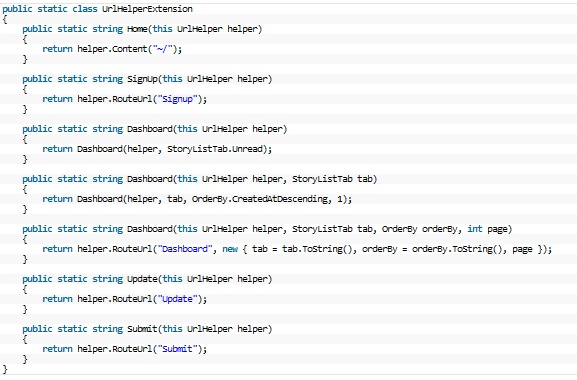
Now in your view it will look like this

Testing
I’ve been hit before by Microsofts in build Testing within Visual Studio 2008, great to have this feature built in, BUT, and a big but in order to run the tests you need to have Visual Studio install, so if you try and setup a Continuous Integration server you will also be required to install Visual Studio.
So best to go with what works well and that is nUnit, simple and easy, and more importantly loosely coupled
Mocking
With testing comes Mocking, and which framework do you use? I also always say keep it simple and easy, so I’m going with Moq, short for “Mock-You”, as this is the only Mock Framework that is built around .Net 3.5 and LINQ.
MVC Validation
Validation is such an important part of development, and the best way I have found for the MVC is by Steven Sanderson, xVal, which is a validation framework for ASP MVC, even Scott Gu thinks it is absolutely fantastic.
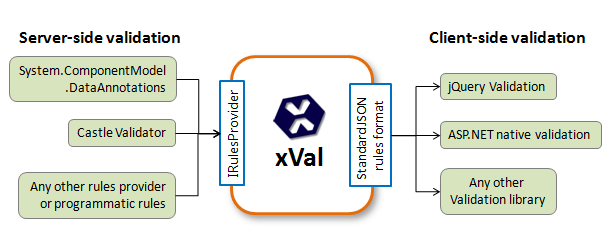
If you are after using xVal with Linq to SQL then it is well worth checking out Integrating xVal Validation with Linq-to-Sql by Adam Schroder
It’s worth checking out Client-side form validation made easy by Adrian Grigore to extend this validation even further.
Don’t take my word for is, check out, ASP.NET MVC Validation Refresh: Best Techniques & Frameworks by Graham O’Neale