Transaction Scope
Need to check out Transaction Scope
Page Notifications
The purpose of the class is to allow the application to display information to the end user.
All that is required is for the calling application to set the Message in the PageNotifications class, e.g.
GradWeb.Web.Core.PageNotifications.Message= "Hello Page Notifier";
The theme of the application will handle the rest, as the design will have positioned and created CSS information to display the message.
Over the course of a page you can add as many message as you like and then will be added to the message.
NOTE
When the page is reloaded the message/'s will be reset.
Design Considerations
The Page Notification control produces the following HTML
<div class="notificationgroup"><div class="notification">Hello Page Notifier</div><div class="notification">Message 2</div></div>
In order to change the look and feel you will require the following style sheet information
notificationgroup{}notification{}
LINQ to SQL and Paging
Oh how I remember those days of page through data, using a GridView controller, or any other controller, lots of coding and so easy to make a mistake.
Just take a look at http://www.unboxedsolutions.com/sean/archive/2005/12/28/818/ by Sean Chase, and you will see what I mean.
Things have moved on a bit since those days, and now we have LINQ it is much easier, both directly feeding from LINQ or via methods, both provide the same result.
Linq DataSource
Here is how to enable paging directly to LINQ, by using the LinqDataSource

How easy could it be?
Linq Methods
When it comes to generating your own method you can do this with just a little more coding and take advantange of the Linq Skip and Take methods, the sample below provides an example using a Method.
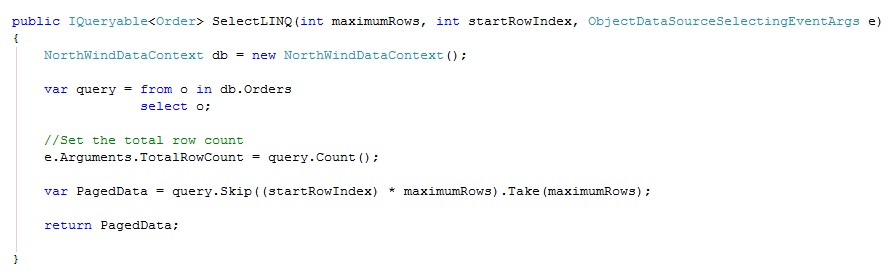
To use this fully you will need to make a few changes to the webpage, as shown below:

Now that you have everything set on the page all that is left is the code behind and the methods, I am using the partial class in the example, but it does not have to be.
Code Behind

Methods
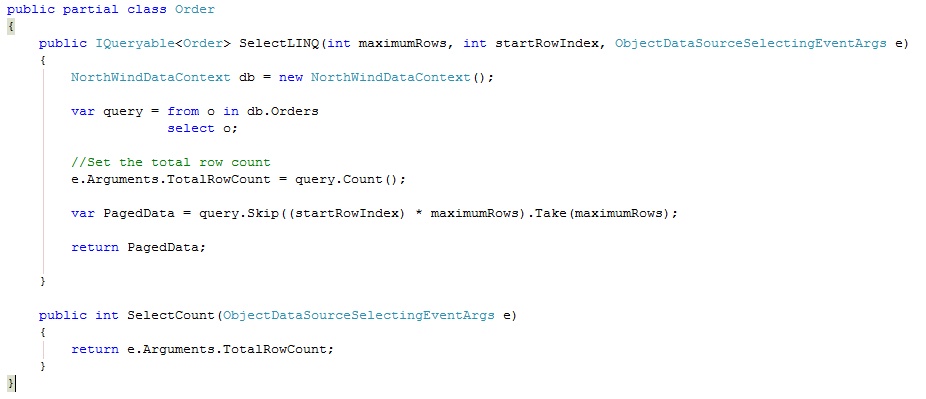
To ensure that the application is Paging correctly I found running the SQL Profiler on the database made sure that only the data page was being returned and nothing else, you may want to perform your own tests too.
I have included a small application using Visual Studio 2008 and .NET 3.5, all you will need to change is the connection string settings to the NorthWind database.
Editable Resource Files
C# 4.0 Dynamic Language
With C# 4.0 going to include Dynamic Language programming, the reports and demos I have seen to date look very impressive.
The only main implementation and useful application was to connect to COM objects, or more to the point to Microsoft Office as this is pure COM, and always been really hard to connect and work with.
I've also seen a demo of using the Dynamic Language to build your own .NET compiler on the fly, so building and running C# code from your own application, how cool is that?
With Dynamic Language for C#, COM should be eaiser to work with.
Microsoft have release the Dynamic Language Runtime on CodePlex so we can start to play with the new features before they are release in C# 4.0
DataContext in LINQ to SQL
What is the best practice and pattern to use for the DataContext with LINQ to SQL.
While using LINQ to SQL and it's DataContext I have found it is very easy to fall in to a concurrency issues when you try out multiusers, I've not found the answer as yet, but I have come across this article for different methods
Best practice and effective way of using DataContext in Linq to SQL?
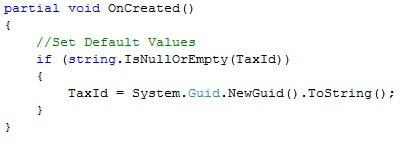
LINQ 2 SQL default values
One little crip I am having with LINQ to SQL is that when you build the DBML files within Visual Studio 2008, the default values from the database are not taken in to account.
This means that you need to set the default values against your object before it is saved or after the object is created.
This is a pain the the back side.
This articles provides a method to overcome this “Handling Default Values With LINQ to SQL“
CodePlex Presentation
List of files and links as part of my Grog talk at DotNetDevNet 2nd December 2008
•CodePlex
•VisualStudio Team System 2008 Team Explorer
•SubVersion
•CodePlex Blog
–http://blogs.msdn.com/codeplex/
Links for The Cloud
Here is a set of link you may need to get you going with Azure and the Microsoft Cloud
DDD7 presentation by Chris Hay, includes Power Point Presentation and Source Code, this is the best examples I have see to date
Welcome To The Cloud (Complete).zip (2.41 mb)
Here are a few links I have found on my travels, that will help getting going
Windows azure developer starter guide
Windows Azure – What Happens in the Data Center?
The cloud for a fast deployment of proof of concepts
The Azure Services Platform is designed to help developers quickly and easily create, deploy, manage, and distribute web services and applications on the Internet. Windows Azure is an operating system for the cloud that serves as the development, run-time, and control environment for the Azure Services Platform. Windows Azure provides developers on-demand compute & storage to host, scale, and manage web applications on the internet through Microsoft data centers.
Windows Azure is elastic, flexible, and interoperable. With Windows Azure developers can achieve high levels of service availability and application interoperability while maintaining freedom of choice.
The Windows Azure SDK provides developers with the tools and APIs needed to develop, deploy, and manage scalable services in Windows Azure.
The Azure Services Training Kit will include a comprehensive set of technical content including samples, demos, hands-on labs, and presentations that are designed to help you learn how to use the Azure Services Platform. This initial PDC Preview release includes the hands-on labs that were provided at the PDC 2008 conference. These labs cover the broad set of Azure Services including Windows Azure, .NET Services, SQL Services, and Live Services. Additional content will be included in future updates of this kit.
Windows Azure Tools for Microsoft Visual Studio extend Visual Studio to enable the creation, building, debugging, running and packaging of scalable services on Windows Azure.
Windows Azure Tools for Microsoft Visual Studio includes:
- C# and VB Project templates for building Cloud Services
- Integration with the Development Fabric and Development Storage services
- Debugging Cloud Service Roles running in the Development Fabric
- Building and packaging of Cloud Service Packages
- Browsing to the Azure Services Developer Portal
- Role configuration
- SSL Certificate selection
Tools for Microsoft Visual Studio
Five webcasts for Azure to help you along the way
- Part: 1 Azure Services for Developers: Fundamentals
- Part: 2 Azure Services for Developers: Developing a Windows Azure Application
- Part: 3 Azure Services for Developers: .NET Services
- Part: 4 Azure Services for Developers: Microsoft SQL Data Services
- Part: 5 Azure Services for Developers: Live Framework Services